

Your compare list is empty!
D-Link DIR-841 AC1200 MU-MIMO Dual Band Wi-Fi Router
-19% 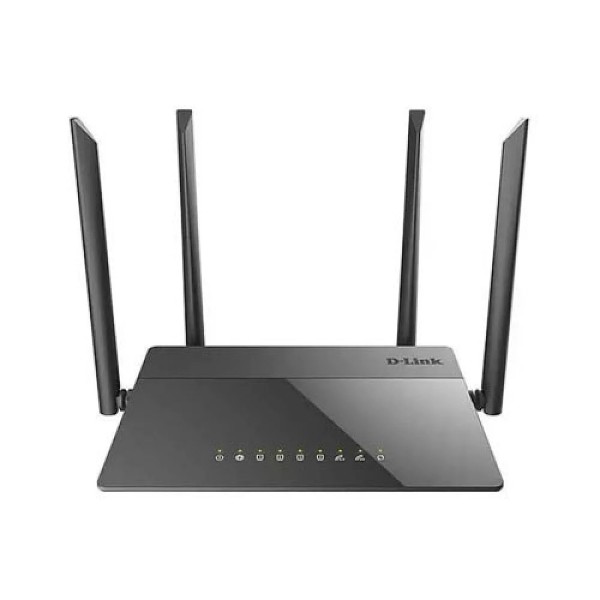


×
❮❯
Save 500৳ · -19%
🔥 Today's Hot Deals - see all offers→ 2,100৳Was 2,600৳
● In stock
Key Features
- AC1200 dual band, 300 + 867 Mbps
- MU-MIMO, beamforming, 4 x 5dBi antennas
- Gigabit WAN, 4 x 10/100 LAN ports
- Guest Wi-Fi, IPsec VPN, IPv6 support
- Specification
- Description
- Reviews (0)
- Questions (0)
- Related
Specification
| Frequency | 2.4GHz + 5GHz |
| Ports | 1 x Gigabit WAN, 4 x 10/100 LAN |
| Type | AC1200 dual band Wi-Fi router |
| Buttons | Power, Wi-Fi on/off, WPS, Reset |
| Processor | Realtek RTL8197H, 1GHz |
| Wi-Fi Band | Dual band, simultaneous |
| WiFi | 802.11a/b/g/n/ac (Wi-Fi 5) |
| Wireless Speed | 300 Mbps + 867 Mbps |
| Power Supply | 12V DC 1A adapter |
| Antennas | 4 x external 5dBi, fixed |
| LAN Ports | 4 x 10/100 Mbps |
| Security | WEP, WPA/WPA2, MAC filter, WPS |
| Standards | MU-MIMO, beamforming, IPv6 |
| WAN Port | 1 x 10/100/1000 Mbps |
| Color | Black |
| Dimensions | 205 x 136 x 33 mm |
Overview
D-Link DIR-841 AC1200 MU-MIMO Dual Band Wi-Fi Router Price in Bangladesh
Looking for a budget dual band router and the D-Link DIR-841 price in Bangladesh? The D-Link DIR-841 is an AC1200 Wi-Fi router with 2.4GHz and 5GHz bands working at the same time. It has four external antennas, MU-MIMO and a Gigabit WAN port.
This router suits flats, small homes and small offices on broadband plans. It is a good upgrade from an old single band router. You can also check the D-Link DIR-841 price in Thakurgaon, since we deliver across the country.
Before you order, note that the four LAN ports run at 100 Mbps, not Gigabit. That is fine for TVs and printers, but not for heavy wired use. Also check that your ISP connection uses an Ethernet cable or ONU.
Top Highlights
- AC1200 Dual Band: 300 Mbps on 2.4GHz plus 867 Mbps on 5GHz.
- MU-MIMO and Beamforming: Serves several phones at once with focused signal.
- Gigabit WAN Port: Takes full advantage of faster broadband internet plans.
- Four 5dBi Antennas: External antennas spread coverage across your home.
About the D-Link DIR-841 AC1200 MU-MIMO Dual Band Wi-Fi Router
Two Bands for Every Device
The 2.4GHz band reaches farther and passes walls better, at up to 300 Mbps. The 5GHz band is faster, at up to 867 Mbps, but works best in nearby rooms. Your phone, laptop and TV can each use the band that suits them.
MU-MIMO for Busy Homes
Older routers talk to one device at a time and make others wait. MU-MIMO lets the router send data to several compatible devices together. Beamforming then aims the signal toward each device instead of spreading it everywhere.
Handy Extra Features
A guest Wi-Fi network lets visitors go online without seeing your home devices. A dedicated button turns Wi-Fi off while wired devices stay connected. The router also supports IPv6 and IPsec VPN tunnels for remote work.
Design & Performance
Design and Build
The DIR-841 has a slim black body measuring 205 x 136 x 33 mm. Four fixed antennas stand at the back, each rated at 5dBi gain. LED lights on the front show power, internet, Wi-Fi and port status.
At the back you find one yellow Gigabit WAN port and four LAN ports. There are also buttons for power, Wi-Fi on and off, WPS and factory reset. The router runs on a small 12V 1A adapter, which is easy to back up with a mini UPS.
Performance in Daily Use
A Realtek RTL8197H processor at 1GHz handles routing and Wi-Fi traffic. In a typical flat, the 5GHz band suits streaming and video calls in nearby rooms. The 2.4GHz band covers farther rooms and older devices that lack 5GHz.
Wireless security supports WPA and WPA2, plus MAC filtering and a built-in firewall. If your internet still feels slow after setup, our guide on fixing slow Wi-Fi explains common causes. Simple changes like router height and channel choice often help a lot.
Who It's For
Families in Flats
A two or three bedroom flat with several phones and a smart TV fits this router well. Dual band keeps streaming on 5GHz while others browse on 2.4GHz. Parents can also give guests a separate Wi-Fi password.
Students and Home Workers
Online classes and Zoom meetings need a steady connection more than raw speed. The 5GHz band reduces interference from neighbours' routers. IPsec VPN support helps people who connect to an office network from home.
Small Shops and Offices
A small office with a few laptops and a printer can share one connection easily. The Gigabit WAN port handles higher speed ISP packages from the provider side. For many wired PCs, add a separate Gigabit switch to the LAN ports.
Simple Buying Guide
Match the Router to Your Plan
AC1200 routers suit most home broadband plans in Bangladesh. If your plan is very fast and you use many wired PCs, consider Gigabit LAN. Our list of the best Wi-Fi routers for home compares options.
Know Your ISP Connection
Some ISPs bring fiber to an ONU box, while others give a direct Ethernet cable. This router connects to either through its WAN port. Learn the difference in our GPON, EPON and XPON ONU guide.
Place It Well and Keep It Powered
Put the router high and near the centre of your home for better coverage. Avoid hiding it inside cabinets or behind metal objects. Our mini UPS buying guide shows how to keep Wi-Fi alive during load shedding.
Easy Steps to Check Before You Order
First, check how your ISP delivers internet to your home, through a direct Ethernet cable or an ONU box.
Next, confirm that your phones, laptops and smart TV support 5GHz Wi-Fi, so they can use the faster band.
Then, decide whether 100 Mbps LAN ports are enough for your wired TVs and PCs.
Last, choose a high and open spot near a power socket, away from walls and metal, for the best signal coverage.
What's in the Box
The box contents are not confirmed in our source, so please ask our team before ordering. The router needs a 12V 1A power adapter to work. When your parcel arrives, check the router, adapter and any cables before signing for delivery.
Why Buy From Megabuy BD?
Megabuy BD sells 100% authentic products sourced for the Bangladesh market. We deliver nationwide, including Thakurgaon, and Dhaka orders usually reach you in 24 to 48 hours. Cash on delivery is available, so you pay only when the router arrives.
Our support team speaks Bangla and English and can help you choose the right router. Tell us your flat size and internet plan, and we will suggest a good fit. We are happy to answer setup questions too.
Frequently Asked Questions
What is the D-Link DIR-841 price in Bangladesh?
The latest D-Link DIR-841 price in Bangladesh is shown at the top of this product page. Prices can change with stock and import costs. Please check the page or contact our team before placing your order to confirm the current offer price.
Are the LAN ports on the DIR-841 Gigabit?
No, the WAN port is Gigabit, but the four LAN ports run at 10/100 Mbps. Wi-Fi on 5GHz can reach up to 867 Mbps for wireless devices. If you need Gigabit wired speed for many PCs, connect a Gigabit switch or choose another router.
Does the DIR-841 work with my ISP's ONU?
Yes, in most cases you connect the ONU or ISP cable to the yellow WAN port. The router then shares the internet over Wi-Fi and the LAN ports. Ask your ISP for your login type and details, such as PPPoE, before setting it up.
Order From Megabuy BD
Check the latest D-Link DIR-841 price in Bangladesh and order your Wi-Fi router from Megabuy BD.
What is the price of D-Link DIR-841 AC1200 MU-MIMO Dual Band Wi-Fi Router?
The latest price of D-Link DIR-841 AC1200 MU-MIMO Dual Band Wi-Fi Router in Bangladesh is 2,100৳. You can buy the D-Link DIR-841 AC1200 MU-MIMO Dual Band Wi-Fi Router at the best price from our website or visit our shop.
Reviews
Questions (0)
Have a question about this product? Ask our team.
Ask questionRecently viewed
2,100৳
2,600৳
