

Your compare list is empty!
Tenda AC5 AC1200 Smart Dual-Band WiFi Router
-14% 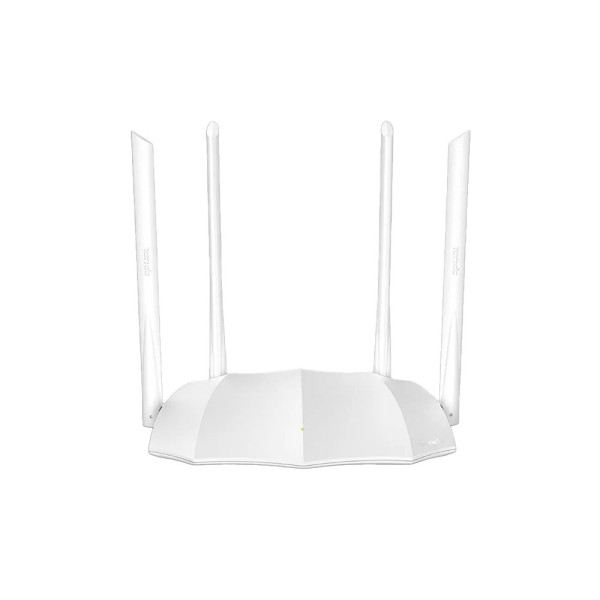


×
❮❯
Save 300৳ · -14%
🔥 Today's Hot Deals - see all offers→ 1,800৳Was 2,100৳
● In stock
Key Features
- AC1200 dual band, up to 1167Mbps
- Four 6dBi external antennas
- 1 WAN + 3 LAN 10/100Mbps ports
- Tenda WiFi App, guest network, IPv6
- Specification
- Description
- Reviews (0)
- Questions (0)
- Related
Specification
| Basic Information | |
|---|---|
| Connectivity | WiFi 802.11ac/n, 2.4GHz + 5GHz |
| Extra Features | Guest WiFi, parental control, IPTV |
| Ports | 1 WAN + 3 LAN |
| Type | AC1200 dual-band WiFi router |
| Power | |
|---|---|
| Operating Temp | 0°C to 40°C |
| Power Supply | DC 9V 1A adapter |
| Technical Specification | |
|---|---|
| Antennas | 4 x 6dBi external |
| Ethernet | 10/100Mbps |
| Management | Tenda WiFi App, web UI |
| Operation Modes | Router, AP, Repeater, WISP |
| Protocol | IPv4, IPv6 |
| Speed | 867Mbps (5GHz) + 300Mbps (2.4GHz) |
| Wireless Security | WPA2-PSK |
| Physical Specification | |
|---|---|
| Color | White |
| Dimensions | 200 x 127 x 33.6mm |
Overview
Tenda AC5 AC1200 Smart Dual-Band WiFi Router Price in Bangladesh
Checking the Tenda AC5 price in Bangladesh? The Tenda AC5 is an AC1200 dual-band WiFi router with four external antennas. It sends WiFi on both 2.4GHz and 5GHz bands from one small white unit.
It is a good fit for flats and small homes with a broadband line up to 100Mbps. Families with phones, laptops and a smart TV will feel the benefit of two bands. The Tenda AC5 price in Thakurgaon is the same as shown on this page.
Before you order, check your internet plan speed with your ISP. The wired ports on this router are 10/100Mbps, not gigabit. That matters if your plan is faster than 100Mbps.
Top Highlights
- AC1200 dual band: Up to 867Mbps on 5GHz plus 300Mbps.
- Four 6dBi antennas: External antennas help spread signal through rooms.
- One WiFi name: Both bands combine and devices pick the better.
- App control: Manage the network from the Tenda WiFi App.
About the Tenda AC5 AC1200 Smart Dual-Band WiFi Router
Two Bands in One Network
The AC5 runs the 2.4GHz and 5GHz bands at the same time. Our source says both can share one WiFi name, and devices are moved to the faster band. You do not need to switch networks by hand as you walk around.
Antennas and Coverage
Four 6dBi external antennas sit around the body of the router. The 2.4GHz band reaches farther through walls, while 5GHz is faster at short range. Placing the router in the centre of your flat gives the best balance.
Modes and Smart Features
Tenda lists Router, AP and Universal Repeater modes, including WISP use. It also lists guest network, parental controls, IPTV and IPv6 support. Parental controls let you set time limits and filter websites for children.
Design & Performance
Design and Build
The AC5 has a flat white body with angled edges and four tall antennas. Tenda lists its size as 200 x 127 x 33.6mm, so it sits easily on a shelf. One small light on the front shows the system status.
On the back, you get one WAN port and three LAN ports, all 10/100Mbps. The WAN port connects to your ONU or modem from the ISP. The LAN ports are for a desktop PC, a TV box or a printer.
Performance in Daily Use
With a 100Mbps fiber plan, the AC5 can share that speed across many devices. The 5GHz band handles video calls, streaming and online classes with less crowding. Older phones and smart plugs can stay on the 2.4GHz band.
Walls, floors and mirrors all weaken WiFi, and 5GHz feels it most. If your WiFi feels slow, read our tips in WiFi slow hole ki korbo. Router placement often matters as much as the router itself.
Who It's For
Families in Flats
A typical family flat has several phones, a laptop and a smart TV. The AC5 gives each of them room on two bands instead of one crowded band. Parents can also use the time limit feature for children.
Upgrading From a Single-Band Router
Many homes still use an old N300 router that only works on 2.4GHz. Moving to dual band can reduce buffering during busy evening hours. For more help choosing, see our guide to the best WiFi router for home in Bangladesh.
Small Shops and Home Offices
A small shop or home office can give customers a separate guest network. Staff devices stay on the main network for better privacy. The LAN ports can feed a desktop PC and a billing printer.
Simple Buying Guide
Match the Router to Your Plan
Check your ISP plan speed before choosing any router. A router with 10/100Mbps ports suits plans up to about 100Mbps. Faster plans need gigabit ports to use the full speed on wired devices.
Think About Power Cuts
Load shedding can drop your internet even when the ISP line is fine. A small router UPS keeps WiFi on during short outages. Our mini UPS range has options for home routers.
Count Your Devices
List every phone, laptop, TV and camera that will use WiFi. More devices need better band sharing, which dual band helps with. Also check if any device needs a wired port.
Easy Steps to Check Before You Order
First, ask your ISP for your plan speed and connection type, such as PPPoE or dynamic IP. Keep your PPPoE username and password ready.
Next, check where your ONU or modem sits, and plan a central, open spot for the router away from metal shelves.
Then, count the wired devices you need to connect, since the router has three LAN ports.
Last, install the Tenda WiFi App if you want to manage the home router remotely from your phone screen.
What's in the Box
Tenda lists four items in the package. Other accessories are not listed. Check the list below.
- Tenda AC5 WiFi router
- RJ45 Ethernet cable
- Power adapter
- Quick installation guide
When the parcel arrives, check that all four antennas and the adapter are in the box. Test it with your internet line first. Keep the box until setup is done.
Why Buy From Megabuy BD?
Megabuy BD sells 100% authentic products from trusted brands like Tenda. We deliver all over Bangladesh, including Thakurgaon, with cash on delivery available. Orders inside Dhaka usually arrive in 24 to 48 hours.
Our support team helps in Bangla and English before and after your order. We can guide you through basic router setup, WiFi names and ISP login settings. You pay only when the router reaches your door, and you can add a power backup from our mini UPS buying guide picks.
Frequently Asked Questions
What is the Tenda AC5 price in Bangladesh?
The latest price is shown at the top of this product page. Prices can change with stock and supplier costs. Please check the page or contact Megabuy BD before ordering. Our team will confirm the current price and delivery time.
Is the Tenda AC5 good for a 100Mbps connection?
Yes, our source says it is designed for medium flats with 100Mbps fiber. Its wired ports are 10/100Mbps, which matches that plan speed. For plans above 100Mbps, a router with gigabit ports is a better choice. Ask our team if unsure.
Can the Tenda AC5 work as a WiFi extender?
Tenda lists Universal Repeater and WISP modes for this router. In those modes it can repeat an existing WiFi signal to reach farther rooms. Setup is done through the router web page or app. Our team can guide you in Bangla.
Order From Megabuy BD
Check the latest Tenda AC5 price in Bangladesh and order from Megabuy BD today.
What is the price of Tenda AC5 AC1200 Smart Dual-Band WiFi Router?
The latest price of Tenda AC5 AC1200 Smart Dual-Band WiFi Router in Bangladesh is 1,800৳. You can buy the Tenda AC5 AC1200 Smart Dual-Band WiFi Router at the best price from our website or visit our shop.
Reviews
Questions (0)
Have a question about this product? Ask our team.
Ask questionRecently viewed
1,800৳
2,100৳
