

Your compare list is empty!
Tenda F6 Wireless N300 Easy Setup WiFi Router
-20% 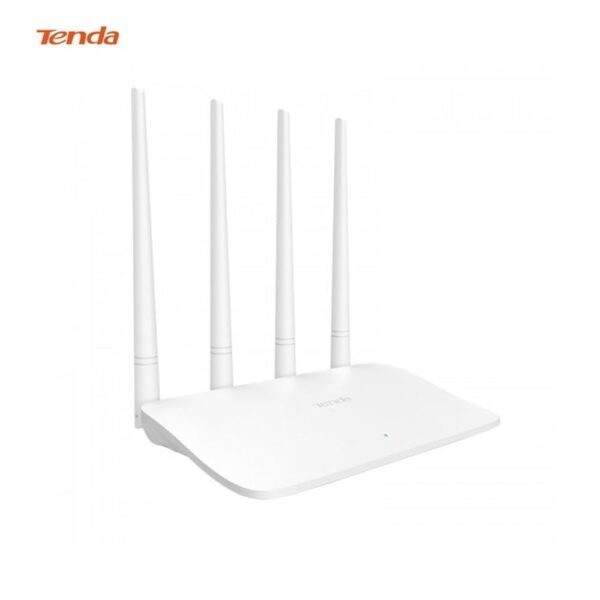

×
❮❯
Save 300৳ · -20%
🔥 Today's Hot Deals - see all offers→ 1,200৳Was 1,500৳
● In stock
Key Features
- Four 5dBi external antennas
- Auto-detects internet connection type
- N300 WiFi, up to 300Mbps on 2.4GHz
- Router, Repeater, WISP and AP modes
- Specification
- Description
- Reviews (0)
- Questions (0)
- Related
Specification
| Basic Information | |
|---|---|
| Connectivity | WiFi 802.11b/g/n, 2.4GHz |
| Extra Features | Auto-detect, parental control |
| Ports | 1 WAN + 3 LAN |
| Type | N300 easy setup WiFi router |
| Buttons | Reset |
| Power | |
|---|---|
| Operating Temp | 0°C to 40°C |
| Power Supply | DC 9V 0.6A adapter |
| Technical Specification | |
|---|---|
| Antennas | 4 x 5dBi external |
| Ethernet | 10/100Mbps |
| Operation Modes | Router, Repeater, WISP, AP |
| Speed | Up to 300Mbps |
| Wireless Security | WPA/WPA2, WPA-PSK/WPA2-PSK |
| Physical Specification | |
|---|---|
| Color | White |
| Dimensions | 204 x 147.5 x 211mm |
Overview
Tenda F6 Wireless N300 Easy Setup WiFi Router Price in Bangladesh
Searching for the Tenda F6 price in Bangladesh? The Tenda F6 is an N300 WiFi router with four external antennas and an easy setup design. It turns your broadband line into 2.4GHz WiFi for the whole family.
It is made for people who want WiFi without a long setup process. Parents, shop owners and older users will like its simple first steps. The Tenda F6 price in Thakurgaon is the same as the price on this page.
Before you order, confirm that your ISP gives you an ONU or an Ethernet line. The F6 does not include a modem. Also check that a 2.4GHz router suits your internet plan.
Top Highlights
- Four 5dBi antennas: External antennas spread WiFi across a home.
- Easy setup: Detects your internet connection type during first setup.
- N300 speed: Up to 300Mbps WiFi on the 2.4GHz band.
- Flexible modes: Works as router, repeater, WISP or access point.
About the Tenda F6 Wireless N300 Easy Setup WiFi Router
Setup Made Simple
Our source says the F6 can detect your internet connection type by itself. It can also help you diagnose basic network problems from the setup page. This means fewer calls to your ISP when something goes wrong at home.
Four Antennas on One Band
The F6 has four 5dBi external antennas, one more than many budget models. All four of them work together on the 2.4GHz band. More antennas can help the signal reach rooms behind thick walls and corners.
Useful Home Features
Tenda lists parental controls with client filters and time limits. A smart WiFi schedule can switch WiFi off at night. Bandwidth control lets you limit heavy users so everyone else can still browse smoothly.
Design & Performance
Design and Build
The F6 has a clean white body with four tall antennas standing at the back. Tenda lists its size as 204 x 147.5 x 211mm with the antennas raised. One SYS light shows that the router is running.
The rear has one WAN port and three LAN ports, all at 10/100Mbps. A reset button sits beside the power jack. It runs on a 9V 0.6A power adapter, according to Tenda.
Performance in Daily Use
For daily browsing, video calls and HD streaming, N300 WiFi handles a few users well. The four antennas help keep the signal steady across a small or medium flat. Heavy downloads on many devices at once can still slow things down.
If WiFi feels slow in some rooms, the cause is often placement or interference. Our guide WiFi slow hole ki korbo lists simple fixes. Try a higher, central spot for the router first.
Who It's For
First-Time Router Buyers
If you have never set up a router, the F6 keeps the job short. Auto-detection reduces the need to know terms like PPPoE or static IP. Our team can still help you over the phone if you get stuck.
Homes With Thick Walls
Many homes in Bangladesh have brick walls that block WiFi. The 2.4GHz band of the F6 passes through walls better than 5GHz. The four antennas add extra help for corner rooms and the far end of the flat.
Shops and Small Offices
A small shop can share WiFi with staff and set limits on bandwidth. The LAN ports can connect a billing PC or a CCTV recorder. Repeater mode can also reach a back store room or a second floor.
Simple Buying Guide
Know Your Internet Speed
The F6 has 10/100Mbps ports and N300 WiFi. That suits most plans up to about 100Mbps. For faster plans, look at a dual-band router with gigabit ports instead.
Keep the Router Running
Power cuts stop the router even if your ISP fiber line stays up. A router UPS keeps WiFi alive during load shedding. Our mini UPS buying guide explains how to choose one.
Compare Router Types
Single-band routers are simple, easy to set up and cost less. Dual-band routers add a faster 5GHz band for busy homes. Our best home WiFi router guide compares both.
Easy Steps to Check Before You Order
First, confirm that your ISP provides an ONU or an Ethernet line, because the F6 has no built-in modem.
Next, keep your ISP login details ready, even though the router can detect the connection type by itself. Some ISPs bind the MAC address.
Then, choose a central place for the router with enough height for the four tall antennas, away from walls.
Last, count how many wired devices you need, since the F6 offers three LAN ports at the back.
What's in the Box
Tenda lists the package items for the F6 below. Our source does not list extra accessories. Check the items when you open the box.
- Tenda F6 wireless router
- Power adapter
- Ethernet cable
- Install guide
Look for any damage to the antennas. Plug in the adapter and check the SYS light. Then connect your internet line.
Why Buy From Megabuy BD?
Megabuy BD sells 100% authentic products from known networking brands like Tenda. We deliver all over Bangladesh, including Thakurgaon, and cash on delivery is available. Orders inside Dhaka usually arrive in 24 to 48 hours, while other districts take a little longer.
Our team helps in Bangla and English before and after your order, including basic setup questions. You pay only after the router reaches your door, which keeps online shopping safe. Browse more items in our accessories store too.
Frequently Asked Questions
What is the Tenda F6 price in Bangladesh?
The latest price is shown at the top of this product page. Prices can change with stock and supplier costs. Please check the page or contact Megabuy BD before ordering. Our team will confirm the current price and delivery time for your area.
What is the difference between Tenda F3 and F6?
Both are N300 routers on the 2.4GHz band with one WAN and three LAN ports. The F6 has four external antennas, while the F3 has three. Our source also lists auto-detection and easy setup features for the F6. Ask our team for a side-by-side comparison.
Does the Tenda F6 have gigabit ports?
No, the WAN and LAN ports on the F6 run at 10/100Mbps. This suits internet plans up to about 100Mbps. For faster plans, a router with gigabit ports will use your speed better. Our team can suggest a suitable model.
Order From Megabuy BD
Check the latest Tenda F6 price in Bangladesh and order from Megabuy BD today.
What is the price of Tenda F6 Wireless N300 Easy Setup WiFi Router?
The latest price of Tenda F6 Wireless N300 Easy Setup WiFi Router in Bangladesh is 1,200৳. You can buy the Tenda F6 Wireless N300 Easy Setup WiFi Router at the best price from our website or visit our shop.
Reviews
Questions (0)
Have a question about this product? Ask our team.
Ask questionRecently viewed
1,200৳
1,500৳
