

Your compare list is empty!
TP-Link ER605 Omada Gigabit Multi-WAN VPN Router
-1% 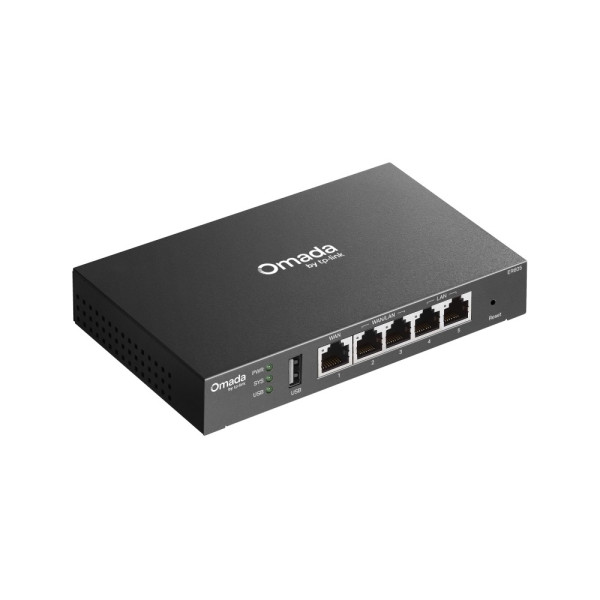


×
❮❯
Save 100৳ · -1%
🔥 Today's Hot Deals - see all offers→ 6,900৳Was 7,000৳
● In stock
Key Features
- Wired VPN router, no Wi-Fi
- 5 Gigabit ports, up to 3 WAN
- USB 2.0 for 4G/3G modem backup
- IPsec, OpenVPN, WireGuard, Omada SDN
- Specification
- Description
- Reviews (0)
- Questions (0)
- Related
Specification
| Extra Features | Load balancing, DDNS, SD-WAN |
| Ports | 5 x Gigabit RJ45, 1 x USB 2.0 |
| Type | Wired multi-WAN VPN router |
| Buttons | Reset |
| Memory | 256MB DDR RAM, 128MB NAND flash |
| WiFi | No (wired router only) |
| Power Consumption | 7.94W max |
| Power Supply | External 12V/1A DC adapter |
| IPsec VPN | 20 tunnels, LAN-LAN, client-LAN |
| L2TP / PPTP | 16 tunnels each |
| NAT Throughput | About 941 / 944 Mbps up/down |
| OpenVPN | 50 tunnels, server and client |
| Sessions | 150,000 concurrent |
| WireGuard / GRE | Supported (GRE: standalone mode) |
| LAN Ports | 2 x Gigabit LAN + 2 x WAN/LAN |
| LED Indicators | PWR, SYS, WAN, LAN, USB |
| Management | Web UI, Omada controller/app |
| Security | Firewall, DoS defense, IP/MAC/URL |
| Standards | 802.3/3u/3ab/3x, 802.1Q VLAN |
| USB Ports | 1 x USB 2.0 (4G/3G modem WAN) |
| WAN Port | 1 x Gigabit WAN + 2 x WAN/LAN |
| Mounting | Desktop / wall-mount |
| Color | Black |
| Dimensions | 158 x 101 x 25 mm |
Overview
TP-Link ER605 VPN Router Price in Bangladesh
Looking for the TP-Link ER605 VPN Router price in Bangladesh? The TP-Link ER605 Omada Gigabit VPN Router is a wired business router with five Gigabit ports. It has no Wi-Fi, so it works as the main gateway of a network.
It suits offices, shops and homes with two or three internet lines. IT staff who need VPN links between branches should also look at it. You can see the TP-Link ER605 VPN Router price in Thakurgaon on this same page.
Before you order, count your internet lines and wired devices. Plan your Wi-Fi, because this router has none. Also decide if you will use an Omada controller.
Top Highlights
- Up to 3 WAN: Load balancing shares traffic across broadband lines.
- Five Gigabit ports: One WAN, two WAN/LAN and two LAN ports.
- Many VPN types: IPsec, OpenVPN, L2TP, PPTP, WireGuard and GRE supported.
- Omada SDN ready: Manage it centrally with an Omada controller or app.
About the TP-Link ER605 VPN Router
A Wired Gateway With No Wi-Fi
The ER605 handles routing, firewall and VPN work, but it does not broadcast Wi-Fi. You connect a switch, access points or a Wi-Fi router to its LAN ports. This split design is common in offices and gives more stable networks.
Multi-WAN Load Balancing
Two of the five ports can work as either WAN or LAN. With the fixed WAN port, you can connect up to three internet lines. The router spreads traffic by each line's bandwidth and keeps you online if one line fails.
USB Port for Mobile Backup
The ER605 has one USB 2.0 port for a supported 4G or 3G USB modem. This mobile line can act as a backup WAN. TP-Link keeps a compatibility list, so check your dongle model first.
Design & Performance
Design and Build
The ER605 has a compact black metal body of 158 x 101 x 25mm. Five RJ45 ports, the USB port, LED lights and a reset button sit on the front. The power jack and a lock slot are on the back.
You can place it on a desk or fix it to a wall. Wall-mount holes are on the bottom of the case. The LEDs show power, system, WAN, LAN and USB activity at a glance.
Performance in Daily Use
TP-Link rates NAT speed at about 941 Mbps upload and 944 Mbps download. It supports up to 150,000 concurrent sessions for busy offices. That is enough for most Gigabit fibre lines sold in Bangladesh.
VPN speed is lower than normal routing, as with all small routers. IPsec reaches about 250 Mbps, while OpenVPN is much slower at about 16 Mbps. Choose IPsec or WireGuard when you need faster branch links.
Who It's For
Small Offices and Shops
An office with two broadband lines can join them on one ER605. Staff get one stable network, even when one ISP has a fault. Firewall rules, URL filtering and VLAN support help keep the office network organised.
Businesses With Branches
Owners with a head office and a few branches can link them with site-to-site VPN. Up to 20 IPsec tunnels are supported. In controller mode, SD-WAN makes adding a new branch much easier.
Advanced Home Networks
Power users at home can connect fibre and broadband lines for backup. Add a Wi-Fi router in access point mode, such as the D-Link DIR-841 dual band router, for wireless coverage. Remote work over VPN also becomes possible.
Simple Buying Guide
Plan Your Wi-Fi Separately
Because the ER605 has no Wi-Fi, budget for access points or a Wi-Fi router. Compare options in our router collection before you decide. Place them where people actually use their phones.
Count Ports and Add a Switch
The ER605 offers two fixed LAN ports, or up to four when you use one WAN. Offices with many PCs, printers and cameras need a switch. Browse our network switch range to add more ports.
Decide on Omada Management
The router works alone through its web page. Cloud access and the Omada app need an Omada controller, which can be cloud, hardware or software based. Plan this before you buy other Omada devices.
Easy Steps to Check Before You Order
First, count how many internet lines you want to connect. The ER605 supports up to three wired WAN lines plus a USB modem.
Next, list every wired device and count the free LAN ports you need. Add a switch if the count is higher than four.
Then, check the hardware version with our team if you need the USB port. TP-Link's current page shows version V2.30.
Last, plan your Wi-Fi access points and network cables. Quality Cat6 cable keeps Gigabit speed between rooms.
What's in the Box
- TP-Link ER605 router
- Power adapter
- RJ45 Ethernet cable
- Rubber feet
This list comes from TP-Link's official package photo. On delivery, check the body, ports and adapter for damage. Power it on and watch the LEDs before you set it up.
Why Buy From Megabuy BD?
Megabuy BD sells 100% authentic products, so you receive the real TP-Link ER605. We deliver all over Bangladesh, including Thakurgaon, Rangpur and Dinajpur. Orders inside Dhaka usually arrive in 24 to 48 hours, while other districts take a little longer.
Cash on delivery is available, so you pay when the router reaches your door. Our team helps in Bangla and English before and after your order. You can also pick up patch cables from our UTP cable section for a tidy setup.
Frequently Asked Questions
What is the TP-Link ER605 VPN Router price in Bangladesh?
The latest price is shown at the top of this product page. Network product prices can change with stock and supplier costs. Please check the page or contact our team before ordering. We will confirm the current price and delivery time for your area.
Does the TP-Link ER605 have Wi-Fi?
No, the ER605 is a wired router with no built-in Wi-Fi. It handles routing, load balancing, firewall and VPN for your network. Connect access points or a Wi-Fi router to its LAN ports for wireless devices. This gives you more control over coverage.
Can I connect two internet lines to the ER605?
Yes, it supports up to three wired WAN lines with load balancing. One port is a fixed WAN and two ports can switch between WAN and LAN. A supported USB modem can add mobile backup. Each WAN line you add reduces the LAN ports.
Order From Megabuy BD
Check the latest TP-Link ER605 VPN Router price in Bangladesh and order from Megabuy BD today.
What is the price of TP-Link ER605 Omada Gigabit Multi-WAN VPN Router?
The latest price of TP-Link ER605 Omada Gigabit Multi-WAN VPN Router in Bangladesh is 6,900৳. You can buy the TP-Link ER605 Omada Gigabit Multi-WAN VPN Router at the best price from our website or visit our shop.
Reviews
Questions (0)
Have a question about this product? Ask our team.
Ask questionRecently viewed
6,900৳
7,000৳
