

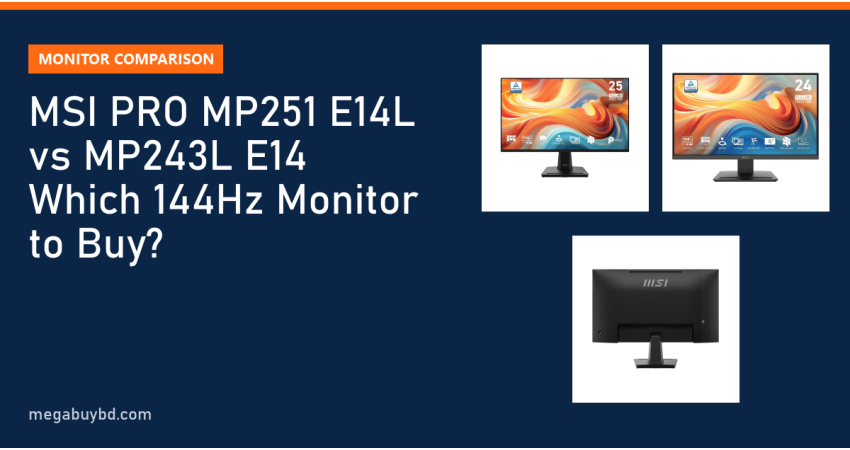
MSI PRO MP251 E14L vs MSI PRO MP243L E14: if you sit close to a normal desk and mostly work in Excel, Chrome and Zoom, get the MP251 E14L. It's a bit bigger and a bit brighter. If every taka counts, or you'll hook up a PS5 or a newer graphics card and like the idea of HDMI 2.0 and HDR Ready on the box, the MP243L E14 is the cheaper pick. Both are Full HD, IPS and 144Hz. At the time of writing the gap between them is 700 Tk.
So this isn't a "good monitor vs bad monitor" fight. They're siblings from the same MSI PRO family. Let's go through what's actually different, and what only looks different on paper.
MSI PRO MP251 E14L vs MSI PRO MP243L E14: The Specs Side by Side
Everything below comes from MSI's own datasheets for both models. Prices are ours at the time of writing; the product page always shows the latest one.
| Spec | MSI PRO MP251 E14L | MSI PRO MP243L E14 |
|---|---|---|
| Screen size | 24.5 inch | 23.8 inch |
| Resolution / panel | 1920 x 1080, IPS | 1920 x 1080, IPS |
| Refresh rate | 144Hz (HDMI), 60Hz (VGA) | 144Hz (HDMI), 60Hz (VGA) |
| Response time | 1ms MPRT / 4ms GTG | 1ms MPRT / 4ms GTG |
| Brightness | 300 nits | 250 nits |
| Colour coverage | 99% sRGB | 102% sRGB |
| HDR | No | HDR Ready |
| Ports | 1x HDMI 1.4b, 1x VGA | 1x HDMI 2.0, 1x VGA |
| Speakers | None | None |
| Stand | Tilt only, -5° to 20° | Tilt only, -5° to 20° |
| VESA | 100 x 100 mm | 100 x 100 mm |
| Weight | 2.89 kg | 2.94 kg |
| Warranty | 3 years | 3 years |
| Our price | 13,200 Tk | 12,500 Tk |
What's Exactly the Same
More than you'd expect. Same resolution, same 144Hz, same 1ms MPRT rating, same AMD FreeSync range of 48 to 144Hz. Both run on an external 12V adapter. Both have an anti-glare finish, a Kensington slot, a 100 x 100 mm VESA mount and a stand that only tilts.
Neither has speakers. Neither has DisplayPort or USB-C. And on both, the VGA port stops at 60Hz, so a VGA-only office PC won't see the smooth part of either monitor.
Honestly, if you put them side by side with the same wallpaper, most people couldn't tell which is which without a tape measure.
The Real Differences
0.7 Inch of Screen
The MP251's active screen area is about 54.4 cm wide; the MP243L's is about 52.7 cm. That's under 2 cm. Small, but you feel it with a wide spreadsheet or two windows side by side.
There's a catch nobody mentions. Same 1920 x 1080 pixels on a bigger screen means slightly bigger pixels. The MP243L works out to roughly 93 pixels per inch, the MP251 to roughly 90. Text on the 23.8 inch looks a hair sharper up close. Will you notice? Probably not at arm's length.
Brightness: 300 vs 250 Nits
This one's real. Fifty nits doesn't sound like much, but in a room with a big window or harsh tube lights, the MP251 holds up better at full brightness. In a normal room in the evening, you'll run both well below max anyway.
Colour: 99% vs 102% sRGB
Ignore this. Both cover the full sRGB range that web pages, YouTube and most photos use. A 3% difference on a datasheet won't show up in daily work.
HDMI 1.4b vs HDMI 2.0
Here's where people get confused. HDMI 2.0 sounds newer, so it must be faster, right? For this kind of monitor, it doesn't matter. MSI rates both ports at 1920 x 1080 up to 144Hz. You get exactly the same picture on either.
The MP243L does support HDMI CEC and MSI Power Link according to MSI; the MP251 doesn't. Small thing. Most office users will never touch it.
HDR Ready
The MP243L can accept an HDR signal. That's what "HDR Ready" means. But with 250 nits of brightness, you won't get the bright, punchy HDR look you see in TV ads. Treat it as a compatibility tick, not a reason to pay more. Luckily you're paying less for it anyway.
Price
At the time of writing, the MP251 E14L is 13,200 Tk and the MP243L E14 is 12,500 Tk. That's 700 Tk for a bigger, brighter screen. Monitor prices in Bangladesh move with the dollar rate, so check both pages before deciding.
Size and Desk Distance
Both monitors are roughly 54 to 56 cm wide with the stand. On a standard 90 or 120 cm office desk, either fits fine with room for a CPU tower or speakers.
For a Full HD screen this size, sitting about 60 to 80 cm back feels comfortable. Closer than that, say on a narrow 45 cm study table, the 23.8 inch is easier on the neck since you don't have to move your eyes as far. Further back, the 24.5 inch makes more sense.
Both stands only tilt. If the screen sits too low for you, a stack of books or a cheap monitor arm (both have 100 x 100 VESA) sorts it out.
Who Should Buy Which
Get the MSI PRO MP251 E14L If...
- You spend 6 to 8 hours a day in spreadsheets, ERP software or browser tabs.
- Your room is bright, or the desk faces a window.
- You're upgrading from an old 19 or 20 inch screen and want it to feel like a real jump.
- You'll game a bit after work, and 700 Tk extra doesn't hurt.
Check the latest price on the MSI PRO MP251 E14L 24.5 inch 144Hz monitor page.
Get the MSI PRO MP243L E14 If...
- You're buying several for an office and 700 Tk per unit adds up.
- Your desk is small or you sit quite close.
- You want a slightly sharper look at Full HD.
- You'll connect a PS5, Xbox or newer PC and want HDMI 2.0 and HDR Ready on the spec list.
See the MSI PRO MP243L E14 23.8 inch 144Hz monitor for the current price.
Other 144Hz Monitors Worth a Look
Not set on MSI? Two cheaper 23.8 inch IPS 144Hz screens we stock are worth comparing.
The Acer EK240Y P6 is 11,000 Tk at the time of writing. It has 99% sRGB, 250 nits, HDMI and VGA, and a 3 year warranty. We haven't confirmed its top refresh rate over VGA, so plan on HDMI.
The Dahua LM24-A221Y is 12,000 Tk. One useful difference: its VGA port goes up to 75Hz instead of 60Hz, which helps a little on older office PCs. You can browse more in our MSI monitor collection or the full monitor price list.
How to Choose Between Them
- Check your computer's ports. HDMI on the PC or laptop? Good, you get 144Hz on either model. VGA only? You're at 60Hz on both, so buy on size and price alone.
- Measure the desk and your sitting distance. Under about 60 cm, lean toward the 23.8 inch.
- Think about the light. Bright room, go MP251.
- Count the units. One monitor, the 700 Tk gap is small. Ten monitors, it's 7,000 Tk.
- Plan for sound. No speakers on either, so budget for headphones or desk speakers.
Still unsure what to look for in general? Our monitor buying guide for Bangladesh covers panel types, sizes and refresh rates in more detail.
MSI Monitor Price in Thakurgaon
The MSI PRO MP251 E14L and MP243L E14 cost the same in Thakurgaon as anywhere else in the country. We deliver all over Bangladesh, including Thakurgaon Sadar, Pirganj, Ranisankail, Baliadangi and Haripur, and you can pay cash on delivery after the monitor arrives.
Frequently Asked Questions
Which is better, MSI PRO MP251 E14L or MP243L E14?
Neither is better across the board. The MP251 E14L has a bigger 24.5 inch screen and 300 nits brightness, which suits long office days and bright rooms. The MP243L E14 is cheaper, a little sharper at Full HD and adds HDMI 2.0 and HDR Ready. For most desk workers we'd pick the MP251.
Does HDMI 2.0 on the MP243L give a better picture than HDMI 1.4b?
No. MSI rates both monitors at 1920 x 1080 up to 144Hz over HDMI, so the picture and smoothness are the same. HDMI 2.0 has more bandwidth, but a Full HD 144Hz monitor doesn't need it. The MP243L also supports HDMI CEC and MSI Power Link, which most users won't use.
Can I get 144Hz on these monitors with VGA?
No. MSI's datasheets cap the VGA port at 60Hz on both the MP251 E14L and the MP243L E14. Use the HDMI port and the HDMI cable to get 144Hz. If your old desktop only has VGA, both monitors still work fine for office tasks, just at 60Hz.
Do the MP251 E14L or MP243L E14 have speakers?
Neither has built-in speakers, and neither has a headphone jack on the monitor. You'll need speakers or headphones connected to your computer. If speakers in the screen matter to you, the MSI PRO MP275 E14L 27 inch has them, but it's a bigger and pricier monitor.
Buy from Megabuy BD
Every monitor we sell is authentic, with official warranty where it applies, and both of these MSI models come with 3 years. We ship across Bangladesh with cash on delivery, and Dhaka orders usually arrive in 24 to 48 hours. Still stuck between the two? Call us. We'll ask about your desk and your PC and tell you straight which one fits.



There are no comments for this Article.