

Your compare list is empty!
Dtech DT-8341 4 Port USB Printer Sharing Switch
-18% 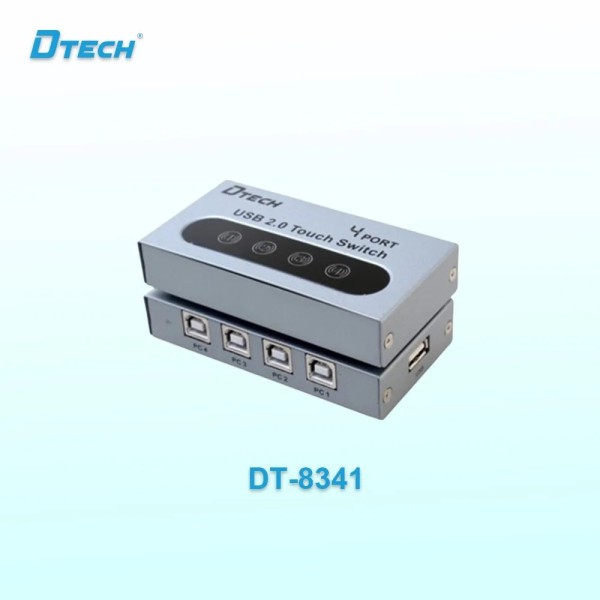


×
❮❯
Save 300৳ · -18%
🔥 Today's Hot Deals - see all offers→ 1,400৳Was 1,700৳
● In stock
Key Features
- 4 PCs share 1 USB printer or scanner
- Touch buttons with LED for selected PC
- USB 2.0, USB powered, no adapter
- Metal shell, Windows compatible
- Specification
- Description
- Reviews (0)
- Questions (0)
- Related
Specification
| Compatible With | Printer, scanner, camera, HDD |
| Control | Touch buttons 1-4 |
| Ports | 4 x USB-B (PC), 1 x USB-A (device) |
| Type | 4-port USB sharing switch |
| USB Port | USB 2.0 (USB 1.1 compatible) |
| Power Supply | USB powered, no adapter |
| LED Indicators | Shows selected PC |
| Supported System | Windows |
| Color | Grey |
| Material | Metal shell |
Overview
Dtech DT-8341 4 Port USB Printer Sharing Switch Price in Bangladesh
Need the Dtech DT-8341 price in Bangladesh? The Dtech DT-8341 is a 4 port USB sharing switch that lets four computers use one USB device. The most common use is sharing one printer between several office PCs.
It suits small offices, shops, coaching centres and cyber cafes with one printer or scanner. It is a USB switch, not a LAN or network switch. The Dtech DT-8341 price in Thakurgaon is the same as on this page.
Before you order, check that your printer connects by USB. You also need one USB cable from each PC to the switch. Only one computer can use the device at a time.
Top Highlights
- Four PC ports: Up to four computers share one USB device.
- Touch switching: Press a front button to pick the active computer.
- No power adapter: The switch draws its power over USB.
- Metal shell: A sturdy body with LED lights for the selected PC.
About the Dtech DT-8341 4 Port USB Printer Sharing Switch
One Printer, Four Computers
Buying a printer for every desk costs a lot of money and space. This switch lets four PCs take turns with one printer through a USB link. The same idea works for a scanner, camera, external hard disk or plotter.
Simple Manual Switching
The front has four touch buttons marked 1 to 4. Press the number of the computer that needs the printer or other device. A small LED shows which PC is connected at that moment.
USB 2.0 Connection
The switch works with USB 2.0 devices and stays compatible with older USB 1.1 devices. The computer side uses USB Type-B ports, like the port on a printer. The device side uses one standard USB Type-A port.
Design & Performance
Design and Build
The DT-8341 has a grey metal shell that feels solid on the desk. The four USB-B computer ports sit in a row on the back panel. The single USB-A device port sits on the side for your printer cable.
Small rubber feet hold the box in place on a table. The touch buttons are flat, so there are no loose switches to break. The size is small enough to sit beside a printer or under a monitor stand.
Performance in Daily Use
The switch is powered through USB, so there is no adapter to plug in. That saves a wall socket in a busy office corner. Just connect the cables and press a button to switch.
The computer that is selected sees the printer as if it were connected directly. When you switch to another PC, the first PC loses the device until you switch back. Finish a print job fully before pressing another button, or the page may stop halfway.
Who It's For
Small Offices
Offices with three or four desks often share one laser printer. This switch avoids the cost of a network printer or print server. Staff simply press their own desk number before they send a print.
Shops and Coaching Centres
A shop counter may have a billing PC and a second PC for records. A coaching centre may print sheets from different teacher computers. One shared printer keeps costs and clutter down in both cases.
Home Users With Several PCs
A family with a desktop and two laptops can share one printer or scanner. Students can print assignments and notes from their own laptop without moving cables. A used laptop for a second user fits this setup well.
Simple Buying Guide
USB Switch or Network Printer?
A network printer connects to your router and needs no switching. A USB sharing switch is cheaper and works with almost any USB printer. Pick the switch if your printer has only USB and your PCs sit close together.
Count Your Cables
Each computer needs a USB A-to-B cable to reach the switch. Long cables can make USB less reliable, so keep the PCs near each other. Browse our cables and converters to see the leads we stock.
Check Your Operating System
The seller lists Windows as the supported system. Install the printer driver on every computer that will use the printer. Each PC must have its own driver setup before switching.
Easy Steps to Check Before You Order
First, confirm your printer or scanner connects with a USB cable. Look for a square USB-B port on the back of the printer.
Next, count the computers that will share it, up to a maximum of four. Place them close to the printer.
Then, arrange one USB A-to-B cable for each computer you will connect. Keep the cables short where you can.
Last, make sure every computer runs Windows and has the device driver installed. This avoids setup problems on the first day.
What's in the Box
The seller has not confirmed the box contents, including whether any USB cables are included. Please ask our team before ordering if you need cables with it. Check the switch and any accessories carefully in front of the delivery person.
Why Buy From Megabuy BD?
Megabuy BD offers 100% authentic products with clear and honest product details on every page. You can explore more office and desk accessories on our website, from stands to cables. Our support team helps in Bangla and English, including simple setup and driver questions.
We deliver to all of Bangladesh, including Thakurgaon, Pirganj and Haripur, with cash on delivery. Orders inside Dhaka city usually arrive in 24 to 48 hours. You pay in cash only when the parcel safely reaches you.
Frequently Asked Questions
What is the Dtech DT-8341 price in Bangladesh?
The latest price is shown at the top of this product page. Prices may change with stock and supplier rates, so check the page before ordering. You can also call our team to confirm the current price and delivery charge for your district.
Can two computers print at the same time?
No, only the selected computer can use the shared device at one time. You press a button to choose which PC is connected. If two people need to print, the second person waits for the first job to finish and then switches.
Is the DT-8341 a network switch?
No, it is a USB sharing switch for printers and other USB devices. It has no Ethernet or LAN ports. It will not share internet or connect computers to each other, so use a LAN switch or router for networking.
Order From Megabuy BD
Check the latest Dtech DT-8341 price in Bangladesh and order your USB sharing switch from Megabuy BD.
What is the price of Dtech DT-8341 4 Port USB Printer Sharing Switch?
The latest price of Dtech DT-8341 4 Port USB Printer Sharing Switch in Bangladesh is 1,400৳. You can buy the Dtech DT-8341 4 Port USB Printer Sharing Switch at the best price from our website or visit our shop.
Reviews
Questions (0)
Have a question about this product? Ask our team.
Ask questionRecently viewed
1,400৳
1,700৳
