

Your compare list is empty!
WiWU WM111 USB 2.0 Wired Office Mouse
-12% 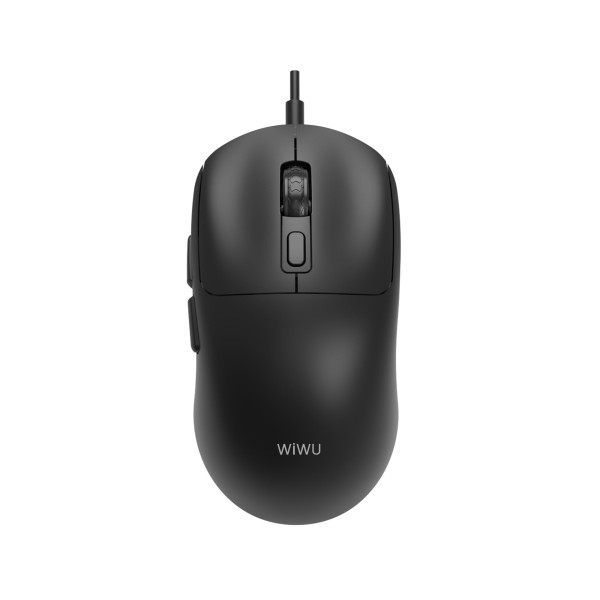


×
❮❯
Save 100৳ · -12%
🔥 Today's Hot Deals - see all offers→ 750৳Was 850৳
● In stock
Key Features
- USB 2.0 wired, 1.8m cable
- DPI 1200 / 1800 / 2400 / 3600
- 6 buttons with side keys
- Switches rated 5 million clicks
- Specification
- Description
- Reviews (0)
- Questions (0)
- Related
Specification
| Basic Information | |
|---|---|
| Cable Length | 1.8m |
| Color | Black / White |
| Connectivity | Wired USB 2.0 |
| Type | Wired USB 2.0 optical mouse |
| Buttons | 6 |
| Sensor | A603EP optical |
| Technical Specification | |
|---|---|
| Default DPI | 1200 |
| DPI | 1200 / 1800 / 2400 / 3600 |
| Encoder Life | 100,000 turns or more |
| Shape | Ergonomic, right-handed |
| Supported System | Windows XP/7/8/10, macOS |
| Switch Life | 5 million clicks or more |
Overview
WiWU WM111 Wired Mouse Price in Bangladesh
This page shows the latest WiWU WM111 Wired Mouse price in Bangladesh. The WM111 is a USB 2.0 office mouse with six buttons and four DPI steps up to 3600. It plugs straight into a computer and never needs charging.
It suits office desktops, cyber cafes and shared family computers. Anyone tired of dead batteries will value a cable link. Freelancers who use back and forward buttons all day will like it too.
Before you order, measure how far your USB port is from your mouse pad. Decide if you prefer the black or the white version. Then check the current price and stock on this page.
Top Highlights
- Four DPI Steps move between 1200, 1800, 2400 and 3600.
- Six Handy Buttons add side keys for quicker page navigation.
- Long-Life Switches are rated for at least five million clicks.
- 1.8m USB Cable reaches tower PCs placed under the desk.
About the WiWU WM111 Wired Mouse
No Batteries, No Pairing
The WM111 draws power from the USB port of your computer. You plug it in and Windows or macOS detects it within seconds. There is no receiver to lose and no charge level to watch.
Side Buttons That Save Time
WiWU gives this mouse six buttons in total. Product images show two buttons on the left side, where your thumb rests. In most browsers, these act as back and forward, which saves many small trips to the toolbar at the top of the screen.
The Sensor Inside
WiWU lists an A603EP optical sensor in the WM111. An optical sensor reads the surface under the mouse to track movement. It works well on a mouse pad, a wooden desk or a matte table, but glass tops can confuse it.
Design & Performance
Design and Build
The WM111 has a contoured shape made for right-handed users. Your palm rests on the raised back while your fingers lie flat on the two main buttons. This natural position helps reduce hand strain during long data entry work.
The mouse comes in black or white with a WiWU logo on the back. The 1.8m cable gives enough slack for a CPU placed on the floor. It also lets you place the mouse pad comfortably away from the keyboard.
Performance in Daily Use
The default speed is 1200 DPI, which feels natural on a laptop or a 22-inch monitor. You can step up to 1800, 2400 or 3600 DPI on the fly. Higher steps help on large or dual monitors where the cursor has more ground to cover.
The switches are rated for five million clicks or more, and the scroll encoder for at least 100,000 turns. In simple words, the parts are built to handle years of normal office clicking. A wired link also means steady response without wireless signal drops.
Who It's For
Office Desktops and Data Entry
Accounts teams, receptionists and data entry staff click thousands of times every day. A durable wired mouse handles that load without any charging routine. IT staff also like wired mice because they are simple to replace and set up.
Shared Family Computers
At home, several people may use one desktop for homework, bills and video calls. Nobody has to remember to charge or switch off the WM111. It is ready the moment the computer turns on.
Users With Multi-Monitor Setups
People using two screens need a mouse that crosses a wide area quickly. The 3600 DPI step helps here without tiring the wrist. If you are upgrading your whole desk, our keyboard range has matching options.
Simple Buying Guide
Wired or Wireless for Your Desk?
A wired mouse is best when the computer stays in one place. A wireless mouse is better for laptops that move around often. Think about where you will use the mouse most of the time.
Check Cable Length and Port Position
Front USB ports on a tower PC make short cables workable. Rear ports often need a longer cable like the 1.8m lead of the WM111. Compare more wired and wireless choices in our mouse category.
Match the Shape to Your Hand
Right-handed shapes support the palm better than flat, symmetric designs. Left-handed users should look for an ambidextrous model instead. If you share the computer, ask everyone which hand they use.
Easy Steps to Check Before You Order
First, confirm that your computer has a free USB-A port, or keep a USB-C adapter ready for a newer laptop.
Next, check that your system is Windows XP, 7, 8, 10 or macOS, as listed by WiWU for this mouse.
Then, choose the black or white colour option above and check the latest price and stock shown on this page.
Last, give a correct phone number and your full address so that our delivery team can reach you without any delay.
What's in the Box
- 1 × WiWU WM111 wired office mouse
According to WiWU, the box holds the mouse with its attached cable. After delivery, plug it in and test all six buttons and every DPI step. Contact our team quickly if something does not work as expected.
Why Buy From Megabuy BD?
Every item we sell at Megabuy BD is 100% authentic, including this WiWU mouse. Home delivery covers the whole of Bangladesh, from Dhaka to the smallest district towns. Customers in Dhaka normally get their wired mouse within a day or two.
Cash on delivery is available, so there is no need to pay online in advance. If you have a question about ports or compatibility, our team answers in Bangla or English. Browse the complete WiWU lineup for bags, stands and other accessories.
Frequently Asked Questions
What is the WiWU WM111 Wired Mouse price in Bangladesh?
You can see the latest WiWU WM111 Wired Mouse price in Bangladesh at the top of this page. Both colours are listed at the same price. Prices may change with new stock, so check before ordering. Our team can confirm it by phone.
Do I need to install a driver for the six buttons?
WiWU describes the WM111 as a plug-and-play USB 2.0 mouse. Basic clicks, scrolling and DPI switching work without extra software. The side buttons usually work as back and forward in browsers. Custom button mapping depends on your own system and software.
Can I play games with the WM111?
The WM111 is designed as an office mouse first. Its 3600 DPI step and wired link are fine for casual games. Serious gamers may want a dedicated gaming mouse with a higher polling rate. Ask our team if you need help choosing.
Order From Megabuy BD
See today's WiWU WM111 Wired Mouse price in Bangladesh and order it from Megabuy BD with home delivery.
What is the price of WiWU WM111 USB 2.0 Wired Office Mouse?
The latest price of WiWU WM111 USB 2.0 Wired Office Mouse in Bangladesh is 750৳. You can buy the WiWU WM111 USB 2.0 Wired Office Mouse at the best price from our website or visit our shop.
Reviews
Questions (0)
Have a question about this product? Ask our team.
Ask questionRecently viewed
750৳
850৳
