

Your compare list is empty!
WiWU WM113 2.4G Wireless Office Mouse
-10% 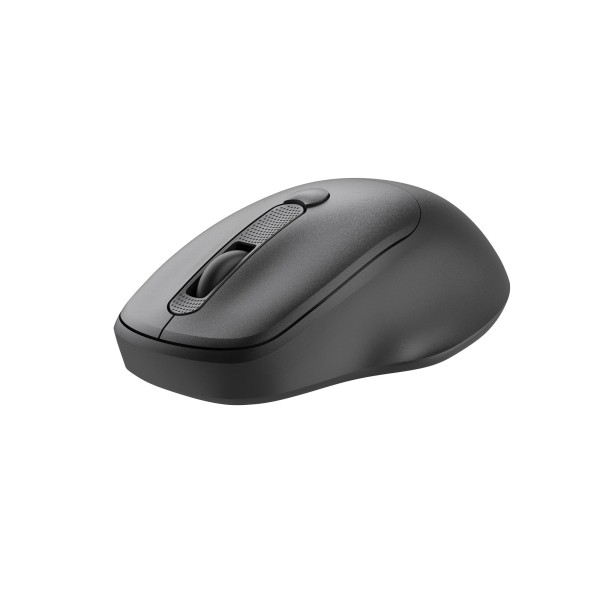


×
❮❯
Save 100৳ · -10%
🔥 Today's Hot Deals - see all offers→ 900৳Was 1,000৳
● In stock
Key Features
- 2.4G wireless, up to 20m range
- DPI 800 / 1200 / 1600, default 1200
- 4 buttons, palm-contoured shape
- Light 58g body, black or white
- Specification
- Description
- Reviews (0)
- Questions (0)
- Related
Specification
| Basic Information | |
|---|---|
| Color | Black / White |
| Connectivity | 2.4G wireless |
| Product Size | 108 × 68.5 × 37.6mm |
| Transmission Range | Up to 20m |
| Type | 2.4G wireless optical mouse |
| Buttons | 4 |
| Technical Specification | |
|---|---|
| Default DPI | 1200 |
| DPI | 800 / 1200 / 1600 |
| Finish | Smooth, skin-friendly coating |
| Mouse Weight | 58g (without battery) |
| Shape | Palm-contoured ergonomic |
| Supported System | Windows XP/7/8/10, macOS |
Overview
WiWU WM113 Wireless Mouse Price in Bangladesh
Looking for the WiWU WM113 Wireless Mouse price in Bangladesh? The WM113 is a 2.4G wireless office mouse with a palm-contoured shape. WiWU sells it in black and white, and it weighs only 58g without the battery.
This mouse suits people who work long hours on spreadsheets, emails and online classes. It also fits a home desk where a cable keeps catching on books or tea cups. Remote workers who move between rooms will like its long wireless range.
Before ordering, decide which colour fits your desk. Check that your computer has a free USB-A port for a wireless receiver. After that, see the current price and stock here.
Top Highlights
- 20m Wireless Range keeps working even when you sit far away.
- Three DPI Levels switch cursor speed between 800, 1200 and 1600.
- Palm-Contoured Shape supports your hand through long office sessions.
- Light 58g Body feels easy to move and carry daily.
About the WiWU WM113 Wireless Mouse
A Simple Four-Button Layout
The WM113 has four buttons, including left click, right click and the scroll wheel. A small button behind the wheel changes the DPI level. There are no confusing extra keys, so anyone in the family can use it on day one.
Range That Goes Beyond the Desk
WiWU rates the 2.4G connection at up to 20 metres. Most people will never sit that far away, but a long range means a stronger signal at normal distance. It also helps when you control slides from across a small meeting room.
A Coating That Stays Clean
WiWU gives the shell an ultra-smooth, skin-friendly coating. The maker says this finish resists smudges, which matters on the white version. In humid weather, a smooth surface is also easier to wipe clean.
Design & Performance
Design and Build
The body measures about 108 × 68.5 × 37.6mm. That is a medium size that fills the palm without feeling bulky. The curved back and side grips guide your hand into a relaxed position.
WiWU lists the weight as 58g, measured without the battery. A light mouse needs less effort for every movement across the desk. Over a full working day, that small saving can reduce tiredness in the wrist.
Performance in Daily Use
DPI tells you how far the cursor moves when you move the mouse. At 800 DPI, the pointer moves slowly, which helps with careful photo edits or small cells in Excel. At 1600 DPI, you cross a large monitor with a short hand movement.
The default setting is 1200 DPI, a comfortable middle point for most laptops. The mouse works with Windows XP, 7, 8 and 10, as well as macOS. For normal pointing and scrolling, you do not need to install any software.
Who It's For
Bank and Office Staff
Office desks are often crowded with files, a phone and a desktop tower. A wireless mouse frees space and removes one more cable from the mess. The simple layout of the WM113 keeps the focus on daily work.
Students in Online Classes
Students switch between Zoom, Google Docs and PDF notes many times a day. A proper mouse is faster and more accurate than a laptop touchpad for this. The light body also fits easily into a school or college bag.
Remote and Home Workers
People working from home often move between a desk, a dining table and a bed. The long range and cable-free design make these moves easy. You can find more options in our full mouse collection if you need a different style.
Simple Buying Guide
Pick the Right DPI Range
Office work rarely needs very high DPI numbers. A range like 800 to 1600 covers documents, browsing and light design work. Very high DPI matters more for large gaming screens.
Think About Your Hand Size
A medium, palm-shaped mouse suits most adult hands for a relaxed grip. People with very small hands may prefer a compact travel mouse. If possible, compare the listed size with a mouse you already own.
Plan Your Port Use
A 2.4G mouse usually connects through a small USB receiver. Many new laptops only have USB-C ports, so an adapter or hub may be needed. Browse our computer accessories for useful add-ons.
Easy Steps to Check Before You Order
First, choose black or white based on your desk, your laptop colour and how often you are happy to wipe the mouse clean.
Next, check that your computer runs Windows or macOS and still has a free USB-A port for the wireless receiver.
Then, confirm the latest price and stock of the WM113 on this page before you place the order, because offers change.
Last, keep your phone switched on so our team can call you to confirm your colour, address and delivery time.
What's in the Box
- 1 × WiWU WM113 2.4G wireless mouse
WiWU lists only the mouse itself in the box contents. Please ask our team about the receiver and the battery before you order. When the parcel arrives, check every item carefully and report any problem to us quickly.
Why Buy From Megabuy BD?
Megabuy BD sells 100% authentic products, so you get the genuine WiWU item and not a copy. We send parcels to every district of Bangladesh through home delivery. Buyers in Dhaka generally receive the WM113 one or two days after confirming.
Cash on delivery means the money changes hands only at your door. Our support team is happy to help you in both Bangla and English, before and after the order. You can also see other WiWU products in Bangladesh on one page.
Frequently Asked Questions
What is the WiWU WM113 Wireless Mouse price in Bangladesh?
The current WiWU WM113 Wireless Mouse price in Bangladesh is shown at the top of this page. The figure may move when fresh stock or a promotion arrives. Look at this page again on the day you buy. A quick phone call to our team also works.
Does the WM113 work with a MacBook?
Yes, WiWU lists macOS support along with Windows XP, 7, 8 and 10. Basic pointing, clicking and scrolling work without extra software. A MacBook with only USB-C ports needs an adapter for a USB receiver. Our team can suggest a suitable adapter.
Which colour should I choose?
The WM113 comes in black and white with the same features and price. Black hides marks and suits dark laptops and keyboards. White looks clean on a light desk but may need wiping more often. Select your colour from the option above.
Order From Megabuy BD
Check the latest WiWU WM113 Wireless Mouse price in Bangladesh and order yours from Megabuy BD today.
What is the price of WiWU WM113 2.4G Wireless Office Mouse?
The latest price of WiWU WM113 2.4G Wireless Office Mouse in Bangladesh is 900৳. You can buy the WiWU WM113 2.4G Wireless Office Mouse at the best price from our website or visit our shop.
Reviews
Questions (0)
Have a question about this product? Ask our team.
Ask questionRecently viewed
900৳
1,000৳
