

Your compare list is empty!
WiWU WM107 WiMice 2.4G Wireless Mouse
-13% 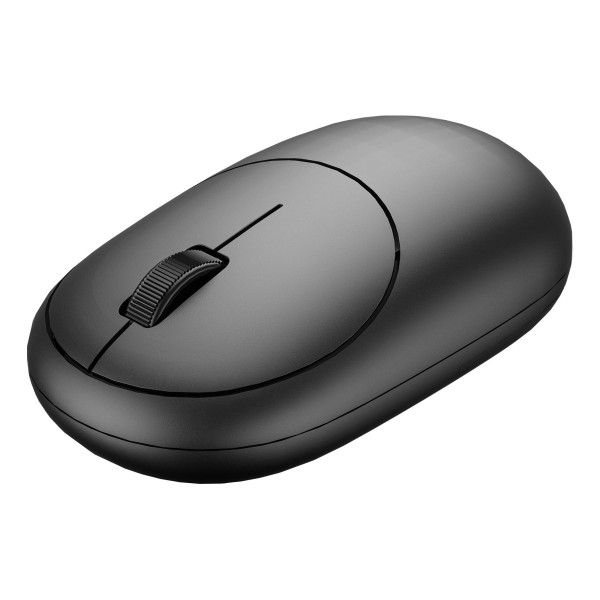


×
❮❯
Save 100৳ · -13%
🔥 Today's Hot Deals - see all offers→ 700৳Was 800৳
● In stock
Key Features
- 2.4G wireless USB receiver
- 1200 DPI optical tracking
- 3 buttons: left, right, scroll
- Compact pebble shape, black
- Specification
- Description
- Reviews (0)
- Questions (0)
- Related
Specification
| Basic Information | |
|---|---|
| Type | 2.4G wireless mouse |
| Buttons | 3 (left, right, scroll wheel) |
| Technical Specification | |
|---|---|
| DPI | 1200 |
| Technology | 2.4GHz wireless |
| Physical Specification | |
|---|---|
| Dimensions | 105.5 × 60 × 30mm |
| Warranty Information | |
|---|---|
| Warranty | 6 Months |
Overview
WiWU WM107 WiMice Mouse Price in Bangladesh
Checking the WiWU WM107 WiMice Mouse price in Bangladesh? The WM107 is a simple 2.4G wireless mouse with three buttons and a smooth pebble shape. This listing is for the black colour.
It is a sensible pick for anyone who wants a low-cost wireless mouse without extra features. Home users, school students and small offices will find it easy to use. It also makes a handy spare mouse.
Before you order, check that your computer has a USB-A port for the receiver. Ask our team about the power source, as sources differ. Then confirm the latest price and stock on this page.
Top Highlights
- 2.4G Wireless Receiver gives a cable-free link to your computer.
- 1200 DPI Sensor moves the cursor smoothly for everyday tasks.
- Three Simple Buttons cover left click, right click and scrolling.
- Compact Pebble Shape measures about 105.5 × 60 × 30mm in size.
About the WiWU WM107 WiMice Mouse
Wireless Without the Fuss
The WM107 uses a small 2.4G USB receiver, as shown on its retail box. You plug the receiver in and the mouse is ready for normal use. There is no Bluetooth pairing step to learn.
Only the Buttons You Need
The mouse has a left button, a right button and a scroll wheel. That covers almost everything in Word, Chrome, Facebook and email. Fewer buttons also means fewer accidental presses for children and elderly users.
A Fixed 1200 DPI Speed
WiWU, its box and other shops all list 1200 DPI for this mouse. This speed is a good middle point for laptop and full HD screens. You can still adjust pointer speed in your computer settings if you want it faster or slower.
Design & Performance
Design and Build
The WM107 has an oval, pebble-like body with a raised oval panel on top. The panel holds the two main buttons and the ribbed scroll wheel. The shell is ABS plastic with a dark matte finish.
The shape is symmetrical, so it can be held in either hand for basic use. Its low height suits people with small or medium hands. Users with very large hands may want a fuller, taller mouse.
Performance in Daily Use
For browsing, typing reports and watching online classes, the 1200 DPI sensor is quite enough. The cursor stays steady for picking menu items and dragging files. On very large screens you may need to raise the pointer speed in settings.
Sources disagree on whether the WM107 uses an AA battery or a built-in rechargeable battery. Because of this, we do not list battery life here. Please ask our team before ordering if the power source matters to you.
Who It's For
First-Time Computer Users
Parents and grandparents who are new to computers often get confused by many buttons. The WM107 keeps things simple with just three controls. It is a friendly first mouse for video calls with family abroad.
Small Offices and Shops
Shops, pharmacies and small offices often need several low-cost mice for billing computers. The WM107 handles basic billing and data entry well. You can also look at a ready keyboard and mouse set such as the GearUP K190 keyboard and mouse combo.
Anyone Who Needs a Spare
Mice often go missing or break at the worst time. Keeping a cheap spare in a drawer saves your work day. The small WM107 takes little space in a bag or desk drawer.
Simple Buying Guide
Start With Your Main Task
Office and study work need only a simple, reliable mouse. Gaming and design work may need more buttons and higher DPI. Buy for your real daily use, not for features you will never touch.
Check the Power Source
Some wireless mice run on AA batteries, while others charge by cable. Battery mice need new cells now and then. Rechargeable mice need a cable and a charger nearby.
Keep the Receiver Safe
A 2.4G mouse cannot work without its tiny receiver. Many users lose it when they unplug it from a laptop. You can compare mice with other connection types in our mouse collection.
Easy Steps to Check Before You Order
First, check that your laptop or desktop has a free USB-A port where the small receiver can stay plugged in all the time.
Next, ask our team whether this unit uses an AA battery or a built-in battery, so you can prepare.
Then, check the latest price and stock status on this page before you order, because offers can change.
Last, keep your phone number active so our team can call you to confirm the order, address and delivery time.
What's in the Box
WiWU's own listing shows one WM107 mouse and one USB receiver in the box. Other items, such as a battery, are not confirmed. Please check with our team before ordering.
When the parcel arrives, open it carefully and find the receiver first. Test the buttons and scroll wheel once. Contact us quickly if anything is missing.
Warranty
The WiWU WM107 comes with a 6 months warranty. Keep your invoice and the original box safe. Contact Megabuy BD with your order number if you face a problem.
Why Buy From Megabuy BD?
Megabuy BD sells 100% authentic products, so the WM107 you get is a genuine WiWU item. We deliver to every district of Bangladesh through home delivery. Orders inside Dhaka usually arrive within 24 to 48 hours.
Cash on delivery is available, so you pay only when the parcel reaches your hands. Our support team is happy to help in Bangla and English, before and after your order. You can also find other WiWU products in Bangladesh on our brand page.
Frequently Asked Questions
What is the WiWU WM107 WiMice Mouse price in Bangladesh?
The latest WiWU WM107 WiMice Mouse price in Bangladesh is shown at the top of this page. Prices can change with stock and offers. Please check the page before ordering. You can also call our team to confirm the current price and stock.
Does the WM107 work without installing software?
Our sources do not mention any driver or app for the WM107. Most simple 2.4G mice work once the receiver is plugged in. If you use an unusual operating system or an old computer, please ask our team before ordering.
Can I use the WM107 with a phone or tablet?
The WM107 connects only through its 2.4G USB receiver, not Bluetooth. A phone or tablet would need a USB port and an OTG adapter that supports mice. Support depends on your device and its software, so please check your phone or tablet model first.
Order From Megabuy BD
Check the latest WiWU WM107 WiMice Mouse price in Bangladesh and order today from Megabuy BD.
What is the price of WiWU WM107 WiMice 2.4G Wireless Mouse?
The latest price of WiWU WM107 WiMice 2.4G Wireless Mouse in Bangladesh is 700৳. You can buy the WiWU WM107 WiMice 2.4G Wireless Mouse at the best price from our website or visit our shop.
Reviews
Questions (0)
Have a question about this product? Ask our team.
Ask questionRecently viewed
700৳
800৳
