

Your compare list is empty!
Samsung LS22D300GAW 21.5 Inch 100Hz FHD IPS Monitor
-8% 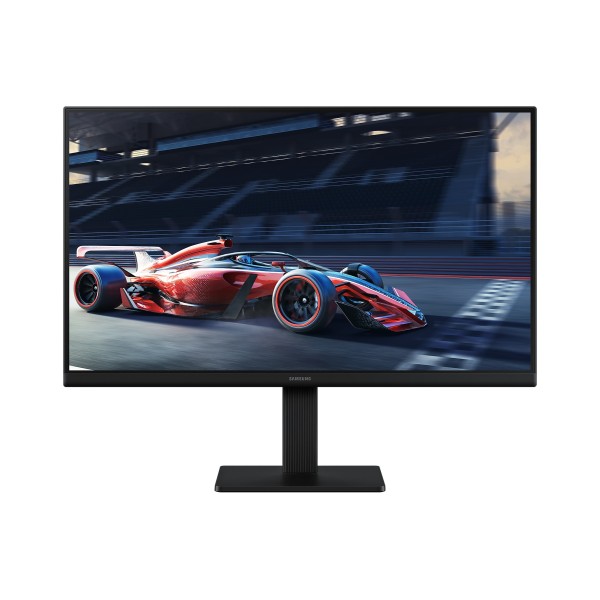


×
❮❯
Save 1,000৳ · -8%
🔥 Today's Hot Deals - see all offers→ 11,800৳Was 12,800৳
● In stock
Key Features
- 21.5 inch Full HD IPS panel
- 100Hz refresh, 5ms GTG
- Eye Saver Mode, flicker-free
- HDMI 1.4 and VGA inputs
- Specification
- Description
- Reviews (0)
- Questions (0)
- Related
Specification
| Brightness | 250 nits typ, 200 nits min |
| Contrast | 1000:1 (static) |
| Display Resolution | 1920 x 1080 (Full HD) |
| Display Size | 21.5 inch |
| Panel Type | IPS |
| Refresh Rate | 100Hz max (60Hz default) |
| Response Speed | 5ms GTG |
| HDCP | 1.4 |
| HDMI | 1 x HDMI 1.4 |
| VGA | 1 x D-Sub (VGA) |
| Operating Temp | 10°C to 40°C |
| Power Consumption | 25W max |
| Power Supply | External adapter, AC 100-240V |
| Adaptive Sync | Not supported |
| Color Depth | 16.7 million colors |
| Curvature | Flat |
| Flicker Free | Yes |
| Low Blue Light | Yes (Eye Saver Mode) |
| NTSC Gamut | 72% NTSC (CIE 1931) |
| Screen Ratio | 16:9 |
| View Angle | 178° / 178° |
| Stand | Tilt -2° to 21° |
| VESA Mount | 100 x 100 mm |
| Color | Black |
| Dimensions | 489.9 x 400 x 175.1 mm (with stand) |
| Warranty | 3 years |
Overview
Samsung LS22D300GAW 21.5 Inch 100Hz FHD IPS Monitor Price in Bangladesh
You'll find the Samsung LS22D300GAW price in Bangladesh at the top of this page. The Samsung LS22D300GAW is part of Samsung's Essential S3 range, model S30GD: a 21.5 inch Full HD IPS monitor that runs at up to 100Hz. Small, plain, sensible.
Who is it for? Mostly people replacing an old 18.5 or 19 inch office screen, or setting up a first desk at home. The Samsung LS22D300GAW price in Thakurgaon is the same as here, by the way.
One thing to know before ordering. Out of the box it runs at 60Hz, so you switch it to 100Hz in the menu yourself.
Top Highlights
- Compact IPS panel: 21.5 inch Full HD screen with 178° viewing angles.
- 100Hz refresh: Smoother scrolling than 60Hz, with 5ms GTG response.
- Easy on eyes: Eye Saver Mode and flicker-free backlight are built in.
- Two inputs: One HDMI 1.4 port and one D-Sub VGA port.
About the Samsung LS22D300GAW 21.5 Inch 100Hz FHD IPS Monitor
Where It Sits in Samsung's Line-up
Samsung calls this series "Essential". That's honest naming. You don't get USB ports, a headphone jack or speakers, and nobody pretends otherwise. What you get is a clean IPS screen from a brand most people already trust.
21.5 Inches in Real Life
The panel is just under 49 cm wide. It fits on the small computer tables you see in a lot of homes and cyber cafés, where a 24 inch screen would hang over the edge. Text at Full HD looks sharp at this size, sharper than on a 24 inch with the same resolution.
Colour and Brightness, Plainly
Brightness is 250 nits, contrast 1000:1, and the colour range covers 72% NTSC. These are normal office-monitor numbers. Fine for documents, YouTube and photos from your phone, not meant for paid colour work.
Design & Performance
Design and Build
It's all black: front, back and stand. The borders are thin on three sides, and the back has a fine ribbed texture rather than shiny plastic. Power comes from an external adapter, so expect a small brick behind the desk.
The stand tilts from about -2° to 21°. That's the only adjustment. If the screen sits too low for you, stack a couple of thick books under the base, or use the 100 x 100 mm VESA holes with a wall mount or monitor arm.
Performance in Daily Use
We mentioned the 60Hz default already. Change it, and remember to pick 100Hz in Windows display settings too. Then the mouse pointer and long web pages move noticeably smoother. It's not a gaming monitor, but casual games feel better than on an old 60Hz panel.
Response time is 5ms GTG, which is normal for IPS at this price. There's no FreeSync or G-Sync support, so very fast games can show a little tearing. For office work and films, you won't care.
Who It's For
Home Offices and Small Shops
Billing counters, reception desks, a small accounts office. Anywhere space is tight and the screen stays on all day. The flicker-free backlight and Eye Saver Mode help on those long shifts, even if you don't notice them working.
Students Moving Off a Laptop Screen
A 14 inch laptop screen gets tiring fast. Plug this in over HDMI and you've got a proper desk setup for classes and assignments. Want something similar from another brand? The Lenovo L22-4e 21.5 inch monitor is in the same size class.
Owners of Older Desktops
Lots of office PCs here still only have a VGA port. This monitor keeps a D-Sub input, so those machines connect without any converter. Newer PCs and laptops simply use HDMI instead.
Simple Buying Guide
Check Your Ports
HDMI 1.4 and VGA. No DisplayPort, no USB-C. If your laptop only has USB-C video out, you'll need a USB-C to HDMI adapter, so plan for that.
Think About Sound
There are no speakers and no audio jack on this monitor. Sound has to come from your PC, either through desktop speakers or headphones. Most people already own one or the other.
Size Versus Budget
If your desk has room, a 24 inch screen gives more working space for a bit more money. If not, 21.5 inches is the sensible size. Browse our full monitor collection to compare sizes side by side.
Easy Steps to Check Before You Order
First, check which video port your computer has. HDMI gives you 100Hz, while an old VGA-only desktop will still connect fine.
Next, measure your desk, because the monitor needs roughly 49 cm of width plus space for the stand.
Then, sort out speakers or headphones, since there's no sound from the monitor itself and no jack to plug them into.
Last, confirm the price on this page, decide if you'll use the stand or a VESA mount, and place your order with Megabuy BD.
What's in the Box
Box contents for this exact regional version aren't confirmed yet. Please ask our team which cables come with it before you order. When the parcel arrives, check the screen and every item straight away, and keep the box for a while.
Warranty
This Samsung monitor comes with a 3 year warranty. Keep your invoice and the original box safe, as both may be needed for a claim. Not sure how the process works? Our team will explain it.
Why Buy From Megabuy BD?
Every product at Megabuy BD is 100% authentic, with official warranty where it applies. We deliver across Bangladesh, including Thakurgaon, and Dhaka orders usually arrive within 24 to 48 hours. Monitors get extra padding, because a cracked panel ruins everyone's day.
Cash on delivery is available, so you pay when it's in your hands. Need help choosing? Call us, in Bangla or English. You can also see other Samsung products we sell, or compare it with the Dahua LM22-A201Y 21.45 inch monitor.
Frequently Asked Questions
What is the Samsung LS22D300GAW price in Bangladesh?
The latest Samsung LS22D300GAW price in Bangladesh is shown at the top of this page. Monitor prices move with stock and the dollar rate, so they can change. Buying several for an office? Message us first and we'll confirm the current price and availability for you.
Why does my new monitor show only 60Hz?
That's the factory default. Open the monitor's on-screen menu and set the refresh rate to 100Hz, then choose 100Hz in Windows display settings as well. Use the HDMI port for this. If anything looks wrong afterwards, call us and we'll walk you through it.
Does this Samsung monitor have speakers or a headphone jack?
No, it has neither. Audio needs to come straight from your computer, through speakers, headphones or a laptop's own sound. It keeps the monitor simple and cheaper. If you need a monitor with built-in sound, ask our team to suggest one.
Order From Megabuy BD
Check the latest Samsung LS22D300GAW price in Bangladesh and order yours today from Megabuy BD.
What is the price of Samsung LS22D300GAW 21.5 Inch 100Hz FHD IPS Monitor?
The latest price of Samsung LS22D300GAW 21.5 Inch 100Hz FHD IPS Monitor in Bangladesh is 11,800৳. You can buy the Samsung LS22D300GAW 21.5 Inch 100Hz FHD IPS Monitor at the best price from our website or visit our shop.
Reviews
Questions (0)
Have a question about this product? Ask our team.
Ask questionRecently viewed
11,800৳
12,800৳
