

Your compare list is empty!
Proton M56S Silent Dual Mode Wireless Mouse
-3% 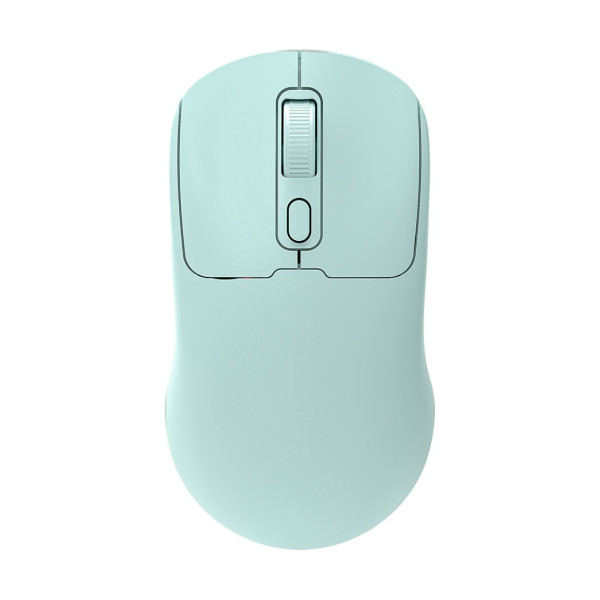


×
❮❯
Save 15৳ · -3%
🔥 Today's Hot Deals - see all offers→ 585৳Was 600৳
● In stock
Key Features
- Bluetooth 5.2 plus 2.4GHz dongle
- Silent clicks, 800-1600 DPI
- 500mAh battery, Type-C charging
- Off White, Lavender, Cyan, Black
- Specification
- Description
- Reviews (0)
- Questions (0)
- Related
Specification
| Connectivity | Bluetooth 5.2 + 2.4GHz wireless |
| Receiver Plug | USB dongle |
| Transmission Range | 5 - 10m |
| Type | Dual mode wireless mouse |
| Buttons | 4 |
| Sensor | Optical |
| Battery | 500mAh rechargeable lithium |
| Charging Port | USB Type-C |
| Click Type | Silent |
| DPI | 800 / 1200 / 1600 |
| Supported System | Windows, macOS, iOS, Android |
| Switch Life | 5 million clicks |
| Technology | Ergonomic shape |
| Color | Off White, Lavender, Cyan, Black |
| Dimensions | 105 x 67 x 39mm (±2mm) |
Overview
Proton M56S Wireless Mouse Price in Bangladesh
Want to know the Proton M56S Wireless Mouse price in Bangladesh? The Proton M56S Silent Dual Mode Wireless Mouse connects by Bluetooth 5.2 or by a 2.4GHz USB dongle. It has quiet clicks and a built-in rechargeable battery.
It is a good match for laptop users, students and people who work in shared rooms. It comes in Off White, Lavender, Cyan and Black. You will find the Proton M56S Wireless Mouse price in Thakurgaon on this same page.
Before you order, check whether your device has Bluetooth or a free USB-A port. Choose your colour from the option list. Keep a USB-C cable and adapter ready for charging.
Top Highlights
- Dual mode connection: Bluetooth 5.2 or 2.4GHz dongle, your choice.
- Silent clicks: Quiet buttons for libraries, offices and late nights.
- Rechargeable battery: 500mAh lithium battery charges through USB Type-C.
- Four colours: Off White, Lavender, Cyan and Black options available.
About the Proton M56S Wireless Mouse
Two Ways to Connect
The M56S works in two modes. Bluetooth 5.2 connects it to a laptop, tablet or phone without using a port, while the USB dongle gives a quick plug-in link to a desktop. The working distance is listed as 5 to 10 metres.
Quiet Buttons and Three DPI Steps
The four buttons include left, right, the scroll wheel and a DPI key. You can switch between 800, 1200 and 1600 DPI to match your screen. The left and right buttons are rated for 5 million clicks.
Works With Many Systems
The brand lists support for Windows, macOS, iOS and Android. That covers most laptops, MacBooks, iPads and Android tablets in Bangladesh. Explore other models in our mouse collection if you need something different.
Design & Performance
Design and Build
The M56S has a smooth, rounded ergonomic body with a soft colour finish. It measures about 105 x 67 x 39mm, so it fits a medium hand well. The scroll wheel and DPI key sit in a line at the top centre.
The pastel colours look fresh on a study desk or in a laptop bag. Off White and Black suit an office setting better. Every colour has its own photo, so you can see it before you order.
Performance in Daily Use
The optical sensor tracks well on a desk or a mouse pad. Use 800 DPI for precise photo editing and 1600 DPI for big monitors. Switching DPI takes one press of the small button behind the wheel.
The silent switches cut most of the clicking noise. This helps in a shared dorm room, a quiet office or a hospital ward at night. Charging through Type-C means one cable can serve your phone and mouse.
Who It's For
Laptop Users and Freelancers
Freelancers often move between home, cafe and co-working space. Bluetooth mode keeps the USB ports free for drives and chargers. If you are still choosing a machine, our guide to the best laptop for freelancing in Bangladesh can help.
Students in Shared Rooms
Hostel and mess rooms are rarely quiet. Silent clicks let you study at night without disturbing a roommate. The bright colours also make the mouse easy to find in a crowded college bag.
Tablet and Phone Users
Many people now use an Android tablet or iPad for office files. A Bluetooth mouse makes editing documents on a tablet much faster. Check that your tablet supports a Bluetooth mouse pointer before you buy one.
Simple Buying Guide
Bluetooth or USB Dongle
Bluetooth saves a USB port and pairs with tablets. A 2.4GHz dongle is easier on an old desktop without Bluetooth. A dual mode mouse like the M56S lets you use both.
Rechargeable or AA Battery
A rechargeable mouse saves money on cells over time. You must remember to charge it now and then. An AA mouse works longer per change but adds running cost.
Choose a Colour You Will Enjoy
Colour does not change performance, but it changes how your desk feels. Light colours show dirt sooner than black. Pick Black for heavy office use and a pastel shade for a personal setup.
Easy Steps to Check Before You Order
First, confirm that your laptop, desktop or tablet has Bluetooth or a free USB-A port for the dongle.
Next, check that your device runs Windows, macOS, iOS or Android, as the brand lists for this mouse.
Then, select your colour in the option list on this page. Each colour shows its own photo, so compare them carefully first.
Last, keep a USB-C charging cable and a phone charger ready at home. The box contents are not confirmed by our sources.
What's in the Box
The exact box contents are not confirmed by our sources. The mouse needs its USB dongle for 2.4GHz mode, so please confirm it with our team. On delivery, check the colour, pair the mouse and test every button before you discard the box.
Why Buy From Megabuy BD?
Megabuy BD sells 100% authentic products, so you get the real Proton M56S. We deliver all over Bangladesh, including Thakurgaon, Panchagarh and Dinajpur. Orders inside Dhaka usually arrive in 24 to 48 hours, and other districts take a little longer.
Cash on delivery is available, so you pay when the mouse reaches your hands. Our team answers your questions in Bangla and English, before and after the order. You can add a stand or hub from our accessories section in the same order.
Frequently Asked Questions
What is the Proton M56S Wireless Mouse price in Bangladesh?
The current price is shown at the top of this page for every colour. Prices can change with stock and supplier costs. Please check the page or contact our team before you order. We will confirm the price, colour stock and delivery time.
Can I use the M56S with a phone or tablet?
Yes, the brand lists iOS and Android support along with Windows and macOS. Use Bluetooth mode to pair it with your phone or tablet directly. Some older devices may not support a mouse pointer. Check your device Bluetooth settings first.
How do I charge the Proton M56S?
The mouse has a 500mAh rechargeable lithium battery with a USB Type-C port. You can charge it with a phone charger or a laptop USB port. Charging time is not stated by our sources. Turn the mouse off when not in use.
Order From Megabuy BD
Check the latest Proton M56S Wireless Mouse price in Bangladesh, pick your colour and order from Megabuy BD.
What is the price of Proton M56S Silent Dual Mode Wireless Mouse?
The latest price of Proton M56S Silent Dual Mode Wireless Mouse in Bangladesh is 585৳. You can buy the Proton M56S Silent Dual Mode Wireless Mouse at the best price from our website or visit our shop.
Reviews
Questions (0)
Have a question about this product? Ask our team.
Ask questionRecently viewed
585৳
600৳
