

Your compare list is empty!
Proton M36S Rechargeable Dual Mode Wireless Mouse
-2% 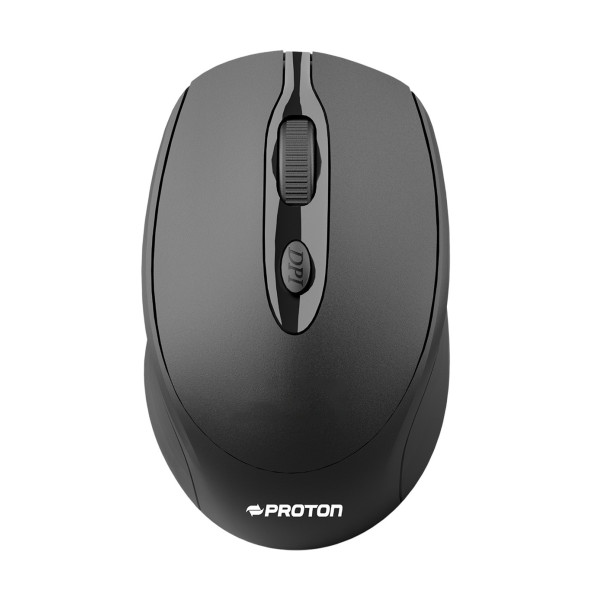


×
❮❯
Save 9৳ · -2%
🔥 Today's Hot Deals - see all offers→ 441৳Was 450৳
● In stock
Key Features
- Bluetooth 5.2 and 2.4GHz modes
- Silent click, three DPI steps
- 500mAh battery with Type-C charging
- 1 year warranty
- Specification
- Description
- Reviews (0)
- Questions (0)
- Related
Specification
| Connectivity | Bluetooth 5.2 + 2.4GHz wireless |
| Receiver Plug | USB dongle |
| Transmission Range | 5 - 10m |
| Type | Dual mode wireless mouse |
| Buttons | 4 |
| Battery | 500mAh rechargeable |
| Charging Port | USB Type-C |
| Click Type | Silent |
| DPI | 800 / 1200 / 1600 |
| Supported System | Windows, macOS, iOS, Android |
| Color | Black |
| Weight | 110g |
| Warranty | 1 Year |
Overview
Proton M36S Wireless Mouse Price in Bangladesh
Checking the Proton M36S Wireless Mouse price in Bangladesh? The Proton M36S Rechargeable Dual Mode Wireless Mouse is a black, quiet mouse that runs on a built-in battery. It links by Bluetooth 5.2 or by a 2.4GHz USB dongle.
It is made for daily office work, online classes and home laptops. People who are tired of buying AA cells will like the Type-C charging. The Proton M36S Wireless Mouse price in Thakurgaon is the same price you see here.
Before ordering, check how you will connect it to your device. Also note that it carries a 1 year warranty from the brand. Keep your invoice for any future claim.
Top Highlights
- Dual mode wireless: Connect by Bluetooth 5.2 or the 2.4GHz dongle.
- Silent clicks: Quiet buttons keep the room calm while you work.
- Type-C rechargeable: 500mAh battery means no more buying AA cells.
- 1 year warranty: Brand warranty covers the mouse for one year.
About the Proton M36S Wireless Mouse
One Mouse for Laptop and Desktop
Use the USB dongle on a desktop PC that has no Bluetooth. Switch to Bluetooth 5.2 on a laptop to keep its ports free. The brand lists a working distance of 5 to 10 metres.
Simple DPI Control
The M36S offers three DPI levels: 800, 1200 and 1600. A small DPI key behind the scroll wheel changes the level. Lower DPI is better for careful work, while higher DPI suits large screens.
A Battery You Recharge
Inside is a 500mAh rechargeable battery with a USB Type-C port. You can charge it from a phone adapter or a laptop port. Compare it with an AA model like the PC Power PCM-966 wireless mouse if you prefer cells.
Design & Performance
Design and Build
The M36S has a classic oval shape with a high back for palm support. Its matte black shell has a glossy grey strip around the wheel. The Proton logo is printed in white near the rear edge.
The listed net weight is 110g, which gives a steady feel on the desk. It has four buttons in total, including the wheel and DPI key. The ridged scroll wheel is easy to grip during long reading and scrolling.
Performance in Daily Use
Silent switches reduce the sharp click sound of normal mice. This is handy in meetings, classrooms and homes with sleeping children. The pointer still responds normally, so work speed does not change.
Dual mode lets you move between two devices without carrying two mice. Pair it with a laptop by Bluetooth and keep the dongle for an office PC. The brand lists Windows, macOS, iOS and Android support.
Who It's For
Office Staff
Office staff spend many hours a day clicking through files and mail. A quiet mouse helps in open offices where desks sit close together. The one year warranty also suits bulk company purchases.
Programmers and Remote Workers
Remote workers often switch between a laptop and a home desktop. Dual mode makes that switch simple without pairing again and again. If you need a new machine as well, read our list of the best laptops for programming in Bangladesh.
Families Sharing One Computer
A family computer is used by students, parents and sometimes grandparents. A simple shape and quiet click make it easy for everyone. Charging once in a while is easier than finding fresh AA cells at night.
Simple Buying Guide
Check Your Connection Options
Older desktops often have no Bluetooth at all. In that case, the 2.4GHz dongle is the way to connect. Newer laptops can use Bluetooth and keep the USB ports free.
Mind the Hand Size
A mouse should fill your palm without stretching the fingers. The M36S has a medium-sized, rounded body. Try to compare it with the mouse you use now before buying.
Think About Your Desk Setup
A good mouse works best with a comfortable desk setup. Keep the screen at eye level and the wrist straight. A laptop stand plus a wireless mouse can reduce neck strain during long work hours.
Easy Steps to Check Before You Order
First, decide whether you will use Bluetooth, the USB dongle or both modes on your devices at home and work.
Next, confirm that each device runs Windows, macOS, iOS or Android, as listed by the brand for this mouse.
Then, keep a USB Type-C cable ready for the first charge, because the box contents are not confirmed.
Last, save the invoice safely when the parcel arrives at your door. You will need it for the 1 year warranty if any problem appears later.
What's in the Box
Our sources do not list the full box contents for the M36S. The 2.4GHz mode needs the USB dongle, so please confirm it with our team. When it arrives, pair the mouse, test all four buttons and check the charging port.
Warranty
The Proton M36S Wireless Mouse comes with a 1 year warranty. Keep the invoice and the box safe for any claim. Contact our team first if the mouse shows a fault.
Why Buy From Megabuy BD?
At Megabuy BD, every product is 100% authentic and comes with official warranty where the brand provides it. We deliver across Bangladesh, including Thakurgaon, Nilphamari and Lalmonirhat. Dhaka orders usually arrive within 24 to 48 hours, and other districts take a little longer.
You can pay with cash on delivery when the mouse reaches you. Our support team speaks Bangla and English and gladly helps with pairing and setup questions. Browse our full mouse range for more wired and wireless options.
Frequently Asked Questions
What is the Proton M36S Wireless Mouse price in Bangladesh?
You can see the latest price at the top of this product page. Prices may change with stock and import costs. Please check the page or call our team before ordering. We will confirm the price and delivery time for your area.
What is the difference between Bluetooth and dongle mode?
Bluetooth mode pairs directly with a laptop, tablet or phone that has Bluetooth. Dongle mode uses a small USB receiver plugged into the computer. The dongle is useful for desktops without Bluetooth. You can choose the mode that fits each device.
Is the M36S really quiet?
The brand lists silent click for this mouse, so the buttons make much less noise than normal switches. You will still hear a soft sound up close. It is a good choice for shared rooms, offices and late night work at home.
Order From Megabuy BD
Check the latest Proton M36S Wireless Mouse price in Bangladesh and order it from Megabuy BD today.
What is the price of Proton M36S Rechargeable Dual Mode Wireless Mouse?
The latest price of Proton M36S Rechargeable Dual Mode Wireless Mouse in Bangladesh is 441৳. You can buy the Proton M36S Rechargeable Dual Mode Wireless Mouse at the best price from our website or visit our shop.
Reviews
Questions (0)
Have a question about this product? Ask our team.
Ask questionRecently viewed
441৳
450৳
