

Your compare list is empty!
Hoco HB56A Victory 3-in-1 USB-A & Lightning Card Reader Metal Gray
-21% 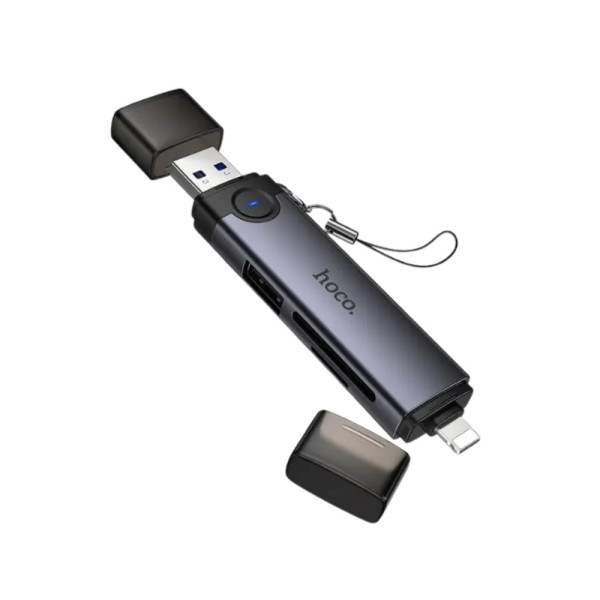


×
❮❯
Save 200৳ · -21%
🔥 Today's Hot Deals - see all offers→ 760৳Was 960৳
● In stock
Key Features
- USB-A and Lightning plugs
- SD 3.0 + TF 3.0, cards up to 2TB
- USB-A 2.0 socket for pen drives
- Aluminium alloy body, 19g
- Specification
- Description
- Reviews (0)
- Questions (0)
- Related
Specification
| Compatible With | USB-A computers, Lightning iPhone/iPad |
| Ports | SD, TF (microSD), 1 x USB-A 2.0 |
| Type | 3-in-1 SD/TF card reader |
| Card Reader | SD 3.0 + TF 3.0, up to 2TB |
| Connector Ends | USB-A male + Lightning male |
| Speed | Lightning and USB-A port: 480Mbps |
| Supported System | Plug and play, no driver, OTG |
| USB Speed | SD/TF up to 5Gbps (theoretical) |
| Color | Metal Gray |
| Weight | 19g |
| Dimensions | 95.6 x 20.7 mm |
| Material | Aluminium alloy |
Overview
Hoco HB56A Victory 3-in-1 USB-A & Lightning Card Reader Metal Gray Price in Bangladesh
Check the top of this page for the current Hoco HB56A USB-A Lightning Card Reader price in Bangladesh. Think of it as a bridge between an iPhone and an ordinary computer. One end has a regular USB-A plug, the other a Lightning plug, and the middle holds an SD slot, a microSD slot and a USB socket.
It suits iPhone owners who still work on a desktop PC or an older laptop with flat USB ports. Office people, mostly. And photographers with a camera bag full of SD cards.
Quick check: no USB-C plug on this one.
Top Highlights
- USB-A and Lightning: One plug for computers, one for iPhone.
- Two card slots: SD 3.0 and TF 3.0, cards up to 2TB.
- Pen drive socket: USB-A 2.0 port, rated up to 480Mbps.
- Metal build: Aluminium alloy body, 19g, lanyard attached.
About the Hoco HB56A Victory 3-in-1 USB-A & Lightning Card Reader Metal Gray
Why USB-A Still Matters
Walk into most offices in Dhaka or Chattogram and the desktops have USB-A ports, not USB-C. Lots of home laptops too. The HB56A plugs straight into those, while still working with a Lightning iPhone when you're away from the desk.
How It Differs From the HB56B
Same Victory body, same slots, same lanyard. The only change is the second plug. The HB56B has USB-C, this one has USB-A. Pick by your computer, not your phone, since both have Lightning.
What Hoco Says on the Box
The packaging reads "USB-A / iP to SD / TF3.0 + USB2.0 card reader", with 5Gbps for the card slots, 480Mbps for USB 2.0, 2TB maximum capacity and OTG support. No driver is needed on any of them.
Design & Performance
Design and Build
It's a slim aluminium alloy stick in metal gray, about 95.6 mm long and 20.7 mm wide, weighing 19 grams. In the photos, each plug has a clear protective cap, and a short black lanyard hangs from one end.
The metal body takes knocks in a bag better than cheap plastic readers do. Its weak spot is those two little caps. Keep them, because a bare USB plug collects lint fast.
Performance in Daily Use
On a computer, through the USB-A plug, the SD and TF 3.0 slots are rated up to 5Gbps. That's a theoretical number. You'll need a USB 3.0 port on the PC (often the blue ones) and a decent card to get anywhere close.
Through Lightning, everything drops to USB 2.0 speed, rated up to 480Mbps. That's how Lightning iPhones work, so don't blame the reader. The USB-A socket for pen drives is USB 2.0 too, fine for documents and photos.
Who It's For
iPhone Users at an Office Desk
Phone photos, scanned documents, a video from a client. Copy them across through the card slots, or use the same reader on the office desktop later. One gadget instead of two, and one less thing to forget at home.
Photographers With an Older Laptop
Your laptop has no card slot but it does have USB-A. Drop the camera's SD card in and offload. Then preview a few shots on the iPhone on the way home, before anything gets edited.
Anyone Swapping Files Without Internet
Slow upload speeds or no Wi-Fi? Physical copies still work. Hand a card or pen drive across the table and you're done. If you need more than a card reader on your laptop, browse our USB hubs and adapters.
Simple Buying Guide
USB-A or USB-C Computer?
Look at your computer's ports. Flat rectangular ones mean USB-A, and this reader fits. If you have only small oval USB-C ports, the HB56B is the better choice, because it swaps USB-A for USB-C.
Lightning iPhone Check
Lightning is on iPhones up to the iPhone 14. The iPhone 15 and newer use USB-C, and this plug won't fit them. Keep iOS updated so the card shows up in the Files app.
Find the Fast Port
On a desktop, use a rear USB 3.0 port if you have one. Front panel ports are sometimes USB 2.0 only, and that caps your speed.
Easy Steps to Check Before You Order
First, confirm your computer has a USB-A port and your iPhone has a Lightning port, since those are the two plugs here.
Next, check which cards you use, full-size SD, microSD or both, and make sure none of them is bigger than 2TB.
Then, if you want to use a pen drive through the socket, check that your phone or computer handles OTG storage.
Last, check the price and stock above, then place your order and test every slot when it arrives.
What's in the Box
We haven't confirmed the full box contents for this model yet. Photos show the reader with caps and a lanyard attached, but please check with our team before ordering. When it arrives, test both plugs, both slots and the socket.
Why Buy From Megabuy BD?
Products from Megabuy BD are 100% authentic. We deliver to all of Bangladesh, Thakurgaon included, and Dhaka orders usually arrive within 24 to 48 hours. Pay cash on delivery when the parcel is in your hands, no advance payment needed at all.
Stuck between the HB56A and HB56B? Tell us what computer and phone you use, in Bangla or English, and we'll point you to the right one. You can also browse more Hoco gadgets or our full accessories range.
Frequently Asked Questions
What is the Hoco HB56A USB-A Lightning Card Reader price in Bangladesh?
The current Hoco HB56A USB-A Lightning Card Reader price in Bangladesh is listed at the top of this page. Accessory prices can change with each new shipment. For office or bulk orders, send us a message and we'll confirm the latest price and stock first.
Will it work with a USB-C laptop or MacBook?
Not directly. The HB56A has a USB-A plug and a Lightning plug, and neither fits a USB-C only laptop. You'd need an adapter, which adds clutter. If your laptop is USB-C, buy the HB56B instead, since it has USB-C plus Lightning and keeps the same slots.
Can I copy photos from my camera's SD card to my iPhone?
Yes. Put the SD card in, connect the Lightning plug and open the Files app on your iPhone. You can then copy photos and videos to the phone. Expect USB 2.0 speed over Lightning, so large video files will take a little while.
Order From Megabuy BD
Check the latest Hoco HB56A USB-A Lightning Card Reader price in Bangladesh and order from Megabuy BD today.
What is the price of Hoco HB56A Victory 3-in-1 USB-A & Lightning Card Reader Metal Gray?
The latest price of Hoco HB56A Victory 3-in-1 USB-A & Lightning Card Reader Metal Gray in Bangladesh is 760৳. You can buy the Hoco HB56A Victory 3-in-1 USB-A & Lightning Card Reader Metal Gray at the best price from our website or visit our shop.
Reviews
Questions (0)
Have a question about this product? Ask our team.
Ask questionRecently viewed
760৳
960৳
