

Your compare list is empty!
Hoco HB53 USB-A Mini TF Card Reader Black
-36% 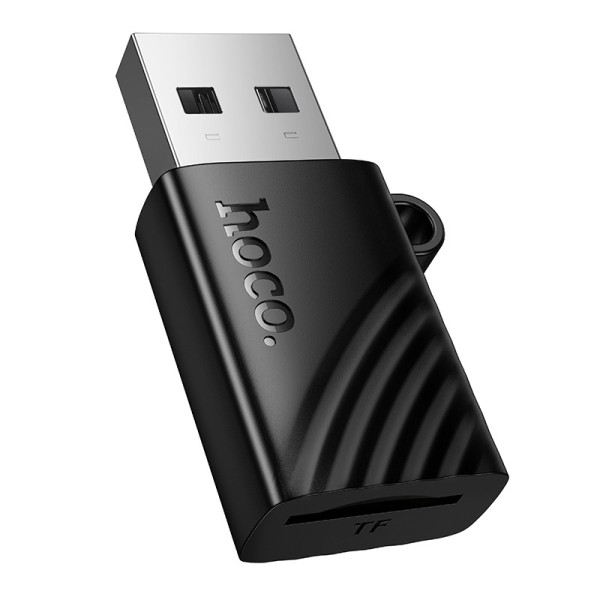


×
❮❯
Save 200৳ · -36%
🔥 Today's Hot Deals - see all offers→ 350৳Was 550৳
● In stock
Key Features
- USB-A plug to microSD (TF) slot
- USB 2.0, up to 480Mbps
- Cards up to 1TB, no driver
- Tiny ABS body, 4g, keyring loop
- Specification
- Description
- Reviews (0)
- Questions (0)
- Related
Specification
| Compatible With | Computers with a USB-A port |
| Type | Mini TF (microSD) card reader |
| Card Reader | 1 x TF (microSD), up to 1TB |
| Connector Ends | USB-A male to TF slot |
| Supported System | Windows XP+, macOS 10.5+, Linux |
| USB Speed | USB 2.0, up to 480Mbps |
| Color | Black |
| Weight | 4g |
| Dimensions | 32 x 20 x 8.5 mm |
| Material | ABS plastic |
Overview
Hoco HB53 USB-A Mini TF Card Reader Black Price in Bangladesh
Scroll up and you'll see the Hoco HB53 USB-A Card Reader price in Bangladesh. It's one of the smallest ways to get a microSD card onto a computer. A regular USB-A plug, a TF slot, a black plastic body about 3 cm long. Done.
Desktop PCs and most office laptops still have that flat rectangular USB port. If your computer has one free, this is the HB53 to get, no adapter in between. Same price for buyers in Thakurgaon as anywhere else, by the way.
Just remember it reads microSD cards only.
Top Highlights
- USB-A plug: Fits the standard USB port on most computers.
- microSD slot: Reads TF cards, with support up to 1TB.
- Plug and play: USB 2.0, up to 480Mbps, no driver.
- Tiny body: 32 x 20 x 8.5 mm and 4g in ABS.
About the Hoco HB53 USB-A Mini TF Card Reader Black
The Computer Version
Hoco sells the HB53 with a USB-A, USB-C or Lightning plug. This is the USB-A one, the plug that's been on PCs for over twenty years. It's the safest bet for an office desktop or an older laptop.
Works on Most Systems
Hoco's packaging lists Windows XP and later, Mac OS X 10.5 and later, and Linux. You plug it in, and the card shows up as a removable drive in File Explorer or Finder. No CD, no download.
Small Enough to Leave Plugged In
It barely sticks out from a laptop. Some people just leave it in a spare USB port as a permanent card slot, which is a fair idea if you're always swapping cards.
Design & Performance
Design and Build
The shell is black ABS with a ribbed wave pattern and a Hoco logo. There's a little loop on one side, so you can thread it onto a keyring or a lanyard. Total weight is 4 grams.
The plug itself is a plain metal USB-A connector. Keep the slot clean, and don't force a card in upside down, the gold contacts should face the right way.
Performance in Daily Use
It's a USB 2.0 reader, rated up to 480Mbps. Real copying speed is lower than that headline, and it depends a lot on the card. Older Class 4 or Class 6 cards will feel slow no matter which reader you use.
For office files, phone photos and dashcam clips, speed isn't a problem. For someone copying a full 256GB card of 4K footage every evening, a USB 3.0 reader would make more sense. Be honest with yourself about which one you are.
Who It's For
Office Desktops
Most office PCs in Bangladesh still don't have a card slot. Someone brings a card from a camera or a phone, and suddenly nobody can open it. Keep one of these in the drawer and that problem goes away for good.
CCTV and Dashcam Backups
Copy recordings from the camera's microSD card to your computer, then clear the card and put it back. It's quicker than downloading over Wi-Fi from some camera apps.
Students and Photographers on a Budget
Action camera, drone, or an old phone's card full of family photos? This gets them onto a laptop cheaply. If your laptop is short on ports, a Baseus Harmonica 5-in-1 USB-C hub adds SD and TF slots plus extra USB.
Simple Buying Guide
Which Port Do You Have?
USB-A is the flat, rectangular port that only goes in one way. If your laptop has only small oval USB-C ports, the Type-C HB53 is the better fit. For iPhones with Lightning, there's the Lightning HB53.
Card Type
This reads microSD (TF) cards up to 1TB. Full-size SD cards from DSLR cameras won't fit the slot, so check your card size first. Many microSD cards come with a big SD sleeve, but this reader needs the small card on its own.
Copy, Then Eject
Always use "Eject" or "Safely Remove" before pulling the reader out. Yanking it mid-copy is the easiest way to corrupt a card, and your photos pay for it.
Easy Steps to Check Before You Order
First, find a free USB-A port on your computer, the flat rectangular one, and make sure nothing is blocking it.
Next, confirm your card is microSD, the small one used in phones and dashcams, not full-size SD.
Then, check that the card is 1TB or smaller, since that's the limit Hoco gives for this reader.
Last, check the price and stock above, then go ahead, order and test it with your card as soon as the parcel arrives at your door.
What's in the Box
The box contents for this model aren't confirmed yet, so please check with our team if that matters to you. When your order arrives, look over the reader and USB plug, then test it with a card straight away while the box is still with you.
Why Buy From Megabuy BD?
At Megabuy BD, every product is 100% authentic. We deliver to every district of Bangladesh, including Thakurgaon, and Dhaka deliveries usually take 24 to 48 hours. You pay cash on delivery, once the parcel is actually with you. If you're ordering for an office, tell us and we'll keep the invoice details right.
Not sure if you need USB-A or USB-C? Call us, we'll sort it out in Bangla or English. You might also like our USB hubs and adapters or more Hoco gadgets.
Frequently Asked Questions
What is the Hoco HB53 USB-A Card Reader price in Bangladesh?
The latest Hoco HB53 USB-A Card Reader price in Bangladesh is shown at the top of this page. Accessory prices sometimes move with new shipments. If you're ordering several for an office, send us a message and we'll confirm the price and stock first.
Can I use it with my phone?
Only if you also have an OTG adapter that turns your phone's port into USB-A, and that's not ideal. It's much simpler to buy the right version. Choose the Type-C HB53 for USB-C phones and the Lightning HB53 for older iPhones. This one is really meant for computers.
Why does my computer not show the card?
First, take the card out and push it back in fully, contacts facing the right way. Then try another USB port, ideally one directly on the computer rather than a front panel. If it still doesn't appear, test the card in another device, because the card may be faulty.
Order From Megabuy BD
Check the latest Hoco HB53 USB-A Card Reader price in Bangladesh and order from Megabuy BD today.
What is the price of Hoco HB53 USB-A Mini TF Card Reader Black?
The latest price of Hoco HB53 USB-A Mini TF Card Reader Black in Bangladesh is 350৳. You can buy the Hoco HB53 USB-A Mini TF Card Reader Black at the best price from our website or visit our shop.
Reviews
Questions (0)
Have a question about this product? Ask our team.
Ask questionRecently viewed
350৳
550৳
