

Your compare list is empty!
Deepcool FH-04 4-Port PWM Fan Hub
-25% 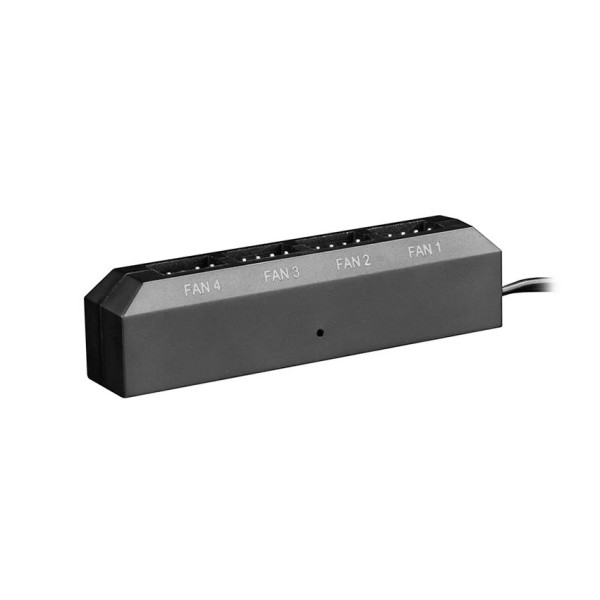


×
❮❯
Save 200৳ · -25%
🔥 Today's Hot Deals - see all offers→ 600৳Was 800৳
● In stock
Key Features
- 4 fan ports from one header
- PWM signal on every port
- 3-pin and 4-pin fans
- Adhesive mount, 550mm cable
- Specification
- Description
- Reviews (0)
- Questions (0)
- Related
Specification
| Cable Length | 550 mm |
| Compatible With | 3-pin and 4-pin case fans |
| Control | PWM, all ports at same duty |
| Ports | 1 x 4-pin in, 4 x 4-pin fan out |
| Type | 4-port PWM fan hub |
| Installation | Double-sided adhesive |
| Speed Reading | Fan 1 port only |
| Color | Black |
| Weight | 22 g |
| Dimensions | 68 x 13 x 17.5 mm |
Overview
Deepcool FH-04 PWM Fan Hub Price in Bangladesh
Run out of fan headers on your motherboard? The Deepcool FH-04 PWM Fan Hub price in Bangladesh buys a small black splitter box that takes one 4-pin fan connection and gives you four fan ports, so extra case fans don't need extra headers.
It's for PC builders adding front, top or rear fans to a case. The Deepcool FH-04 PWM Fan Hub price in Thakurgaon is the same as shown here.
Check two things first. How many fans will you connect, and what current can your motherboard fan header actually handle?
Top Highlights
- Four fan ports: One 4-pin input splits into four outputs.
- PWM on each port: All fans follow one speed signal together.
- 3-pin and 4-pin: Both fan types plug into the hub.
- Adhesive mounting: Sticks inside the case with included tape.
About the Deepcool FH-04 PWM Fan Hub
What a Fan Hub Solves
Budget motherboards often have just one or two system fan headers. Cases now ship with three or more fans. A hub lets those fans share one header, and you get a tidier build in the bargain.
How the PWM Control Works
Each port carries the PWM signal, so speeds change together when the board adjusts the header. One catch, and Deepcool states it plainly: only the fan on port 1 reports its RPM to the system. The others spin, but your software won't show their speed.
Size and Cable
The hub measures 68 x 13 x 17.5 mm and weighs 22 g. Its connection cable is 550 mm long, enough to reach a header from most spots in a mid-tower.
Design & Performance
Design and Build
It's a slim black strip with the ports labelled FAN 1 to FAN 4 along one side. Double-sided adhesive comes with it, so you can stick it behind the motherboard tray or on the case floor where nobody sees it.
Before you stick it down, plan the cable routes. Put the hub where every fan cable reaches without stretching. Clean the surface with a dry cloth first, otherwise the tape won't hold well in dusty cases.
Performance in Daily Use
Once connected, set the fan curve in BIOS for that one header, and all four ports follow. Simple. If you use PWM fans, they'll speed up under load and slow down at idle together.
Three-pin fans plug in too, but they don't have a PWM wire. So they can't receive that speed signal and usually run at whatever voltage the header sends. If silence matters to you, stick with 4-pin PWM fans on this hub.
Who It's For
Budget Builders With Extra Case Fans
Your case came with four fans and the board has two headers? This fixes that problem without buying a new board. It's a very common situation in entry-level builds, and a hub is the cheapest, simplest answer.
Upgraders Adding Airflow
Adding fans to an older office PC that's being turned into a gaming setup? Pair the hub with a reliable, properly rated power supply, because a stronger GPU and more fans increase the load on the whole system.
People Who Like Clean Cable Work
One cable to the board instead of four looks neater and blocks less airflow. If you're planning a compact build, have a look at our desktop and mini PC range.
Simple Buying Guide
Check the Header's Current Rating
All four fans share one header's power. Find the header's rated current in your motherboard manual, then add up the fans' rated current from their labels. If it's too close, ask us before ordering.
Want RPM Readings on Every Fan?
Then this isn't the right hub. Only fan 1 reports speed to the board. For most home builds that's fine, since one reading tells you the fans are spinning.
RGB Is a Separate Cable
This hub handles fan power and speed only. ARGB lighting on fans uses its own 3-pin 5V connector and needs a separate controller or a matching motherboard header.
Easy Steps to Check Before You Order
First, count your fans and check that each one uses a standard 3-pin or 4-pin fan plug, not a Molex or SATA power plug.
Next, find a free 4-pin fan header on the motherboard and note where it sits, so the 550 mm cable reaches it comfortably.
Then, read the header's current limit in your motherboard manual and compare it with your fans' labels.
Last, confirm the price on this page and order with cash on delivery. Keep the box until the build runs.
What's in the Box
- Deepcool FH-04 fan hub with connection cable
- Double-sided adhesive for mounting
Any other items are not confirmed, so check with us if you need extra cables. On delivery, inspect the four ports and the cable plug for bent pins before mounting it.
Why Buy From Megabuy BD?
Megabuy BD sells 100% authentic products only, so you get a genuine Deepcool hub, not a generic splitter in a copied box. We deliver nationwide, including Thakurgaon and Haripur, and Dhaka orders usually arrive in 24 to 48 hours. Pay cash when it arrives, with no advance payment.
Unsure if your motherboard header can drive four fans? Send us the board model. We'll check the manual and answer in Bangla or English, and our accessories page has more for your build.
Frequently Asked Questions
What is the Deepcool FH-04 PWM Fan Hub price in Bangladesh?
You'll see the latest price at the top of this page. Imported PC parts can change price with new shipments. If you're building several PCs for an office or a gaming zone, message us first and we'll confirm stock and price.
Why does my software show speed for only one fan?
That's normal for the FH-04. Deepcool designed it so only the fan on port 1 sends its RPM to the motherboard. Put your most important fan, like the rear exhaust, on port 1 so you can still monitor it in BIOS.
Can I connect a CPU cooler fan to this hub?
We'd keep the CPU fan on its own CPU header. Many boards warn or refuse to boot if they don't detect a CPU fan speed. Use the hub for case fans, where a missing speed reading won't cause any trouble.
Order From Megabuy BD
Check the current Deepcool FH-04 PWM Fan Hub price in Bangladesh and order from Megabuy BD today.
What is the price of Deepcool FH-04 4-Port PWM Fan Hub?
The latest price of Deepcool FH-04 4-Port PWM Fan Hub in Bangladesh is 600৳. You can buy the Deepcool FH-04 4-Port PWM Fan Hub at the best price from our website or visit our shop.
Reviews
Questions (0)
Have a question about this product? Ask our team.
Ask questionRecently viewed
600৳
800৳
