

Your compare list is empty!
Baseus FastJoy Series WiFi 6 Adapter 1800Mbps Dual Band with External Antennas
-5% 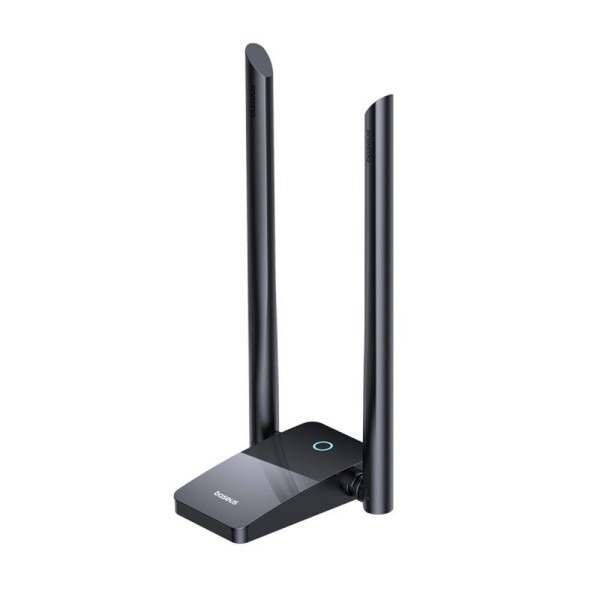


×
❮❯
Save 150৳ · -5%
🔥 Today's Hot Deals - see all offers→ 2,700৳Was 2,850৳
● In stock
Key Features
- Up to 1800Mbps, 2.4GHz + 5.8GHz
- Wi-Fi 6 support with TWT
- Two adjustable 5dBi antennas
- Desk stand with 1m Micro USB cable
- Specification
- Description
- Reviews (0)
- Questions (0)
- Related
Specification
| Basic Information | |
|---|---|
| Cable Length | 1m Micro USB cable |
| Color | Black |
| Connectivity | Dual band 2.4GHz + 5.8GHz |
| Type | USB Wi-Fi 6 adapter with stand |
| Technical Specification | |
|---|---|
| Antennas | 2 × 5dBi external, adjustable |
| Speed | Up to 1800Mbps (600 + 1200) |
| Supported System | Windows 10 / Windows 11 |
| Technology | Wi-Fi 6, TWT, hotspot mode |
Overview
Baseus FastJoy WiFi Adapter 1800Mbps Price in Bangladesh
Searching for the Baseus FastJoy WiFi Adapter 1800Mbps price in Bangladesh? It is a USB Wi-Fi adapter with a desk stand and two tall antennas. Baseus rates it at up to 1800Mbps across two bands.
It is built for desktop PCs that have no Wi-Fi card and for laptops with weak built-in reception. Home office workers, students and gamers in far rooms benefit most. It also works as a hotspot.
Before ordering, check that your computer runs Windows 10 or Windows 11. Confirm that your router offers a 5GHz band for the top speed. Then check the Baseus FastJoy WiFi Adapter 1800Mbps price in Thakurgaon or elsewhere on this page.
Top Highlights
- 1800Mbps Dual-Band gives 600Mbps on 2.4GHz and 1200Mbps on 5.8GHz.
- Wi-Fi 6 Support works with newer routers and supports TWT power saving.
- Twin 5dBi Antennas tilt and turn to catch a stronger signal.
- Desk Stand Design sits away from the PC on a 1m cable.
About the Baseus FastJoy WiFi Adapter 1800Mbps
Give a Desktop PC Wireless Internet
Most desktop towers in offices and homes come without Wi-Fi. Running a LAN cable across the house is not always possible. The FastJoy plugs into USB and lets the PC join your wireless network.
Two Bands Explained Simply
The 2.4GHz band travels further and passes walls more easily, but it is slower. The 5.8GHz band is faster, but its range is shorter. The adapter supports both, so you can pick the band that suits each room.
Antennas Away From the Metal Case
A small USB stick behind a steel PC case often gets a weak signal. This adapter sits on a stand at the end of a 1m cable. You can place it on the desk or a shelf where the signal is clearer.
Design & Performance
Design and Build
The base is a black, flat stand with a glossy top and a small round indicator light. Two 5dBi antennas rise from its sides. Baseus measures it at about 187mm tall, with an 87mm deep base.
The antennas bend up to 180 degrees forward and 90 degrees to the side. This lets you aim them toward the router or open space. A Micro USB port on the stand connects the supplied 1m cable.
Performance in Daily Use
The 1800Mbps figure is the combined theoretical speed of both bands. Real speed depends on your internet package, router, walls and distance. For example, a 50Mbps home line cannot go faster than 50Mbps through any adapter.
Wi-Fi 6 support and TWT help when your router also supports these features. TWT lets connected devices rest between data bursts, which can reduce power use. On a Wi-Fi 5 router, the adapter still connects, using the older standard.
Who It's For
Desktop PC Owners Without Wi-Fi
If your office or home PC only has a LAN port, this adds wireless access in minutes. You can move the PC to any room with router coverage. There is no need to open the case or fit a card.
Laptop Users With Weak Reception
Some older laptops have small internal antennas that drop signal in far rooms. The FastJoy gives the laptop a larger external antenna pair on the desk. You can find mice, keyboards and other computer accessories for the same desk too.
People Who Need a Quick Hotspot
The adapter supports a hotspot mode as well as normal receiver mode. A PC on a wired connection can then share internet with a phone or tablet. This is handy in a hostel room or small office.
Simple Buying Guide
Check Your Router Bands First
Look at your router's label or settings page. If it shows a 5GHz network, you can use the faster band. If it is 2.4GHz only, the adapter will still work at 2.4GHz speeds.
Confirm the Operating System
Baseus shows Windows 10 and Windows 11 for this model. Driver support for other systems is not confirmed, so ask before buying for Linux or macOS. For other USB wireless add-ons, see our Bluetooth adapter range.
Think About Placement
Put the stand in open space, away from metal cabinets and thick walls. Raise it on a shelf if the router is upstairs. Small changes in position can make a clear difference.
Easy Steps to Check Before You Order
First, check that your PC or laptop has a free USB port and runs Windows 10 or Windows 11 before you choose this adapter.
Next, check whether your router broadcasts a 5GHz network, because the highest speed needs that band.
Then, look at the latest price and stock status on this page, since offers can change from week to week.
Last, keep your phone switched on so our team can call you to confirm the order and your delivery address.
What's in the Box
Baseus shows the adapter with a 1m Micro USB cable for your computer. Other box contents are not confirmed, so ask our team first. Keep the packaging until setup is done.
When the parcel arrives, check the antennas and stand for damage. Connect it to your PC and test the Wi-Fi once. Contact us quickly about any problem.
Why Buy From Megabuy BD?
Every product we sell is 100% authentic, so you receive a genuine Baseus FastJoy adapter in its original packaging. We deliver all over Bangladesh, including Thakurgaon, through our home delivery service. Orders inside Dhaka usually arrive within 24 to 48 hours.
Cash on delivery lets you pay only after the parcel is in your hands. Our support team speaks Bangla and English and can help you check your router and computer first. Browse more Baseus gadgets in Bangladesh on our brand page at Megabuy BD.
Frequently Asked Questions
What is the Baseus FastJoy WiFi Adapter 1800Mbps price in Bangladesh?
The current price is shown at the top of this product page. It can change when new stock arrives or when a running offer ends. Please check the page before you order. You can also call our team to confirm the price.
Will I really get 1800Mbps internet speed?
No, 1800Mbps is the combined theoretical link speed of both bands. Your real speed is limited by your internet package and router. Walls and distance also lower it. The adapter helps most when your current Wi-Fi signal is the weak point.
Does it need a driver CD to install?
Baseus describes it as plug and play with a built-in driver and one-click installation. You do not need a disc on Windows 10 or Windows 11. Other systems are not confirmed by Baseus. Ask our team if you use a different system.
Order From Megabuy BD
Check the latest Baseus FastJoy WiFi Adapter 1800Mbps price in Bangladesh and order it from Megabuy BD today.
What is the price of Baseus FastJoy Series WiFi 6 Adapter 1800Mbps Dual Band with External Antennas?
The latest price of Baseus FastJoy Series WiFi 6 Adapter 1800Mbps Dual Band with External Antennas in Bangladesh is 2,700৳. You can buy the Baseus FastJoy Series WiFi 6 Adapter 1800Mbps Dual Band with External Antennas at the best price from our website or visit our shop.
Reviews
Questions (0)
Have a question about this product? Ask our team.
Ask questionRecently viewed
2,700৳
2,850৳
