

Your compare list is empty!
PC Power PCM-378-4D Wired USB Mouse
-40% 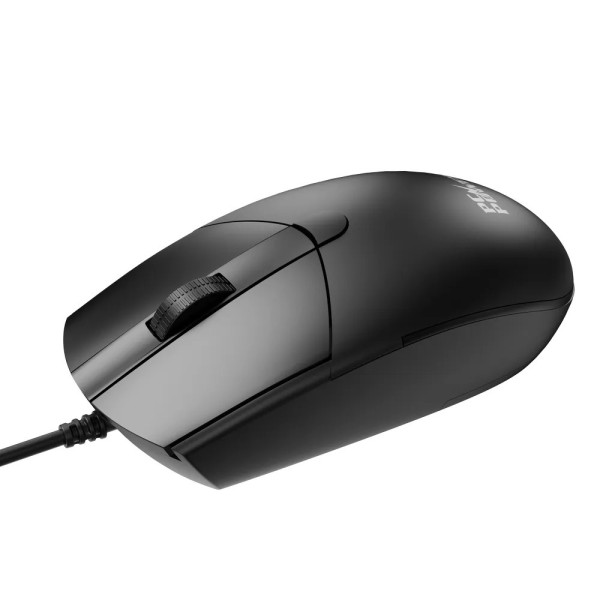

×
❮❯
Save 200৳ · -40%
🔥 Today's Hot Deals - see all offers→ 300৳Was 500৳
● In stock
Key Features
- 4-button wired USB optical mouse
- DPI switch: 1000, 1600, 2000
- 3M click left/right switches
- 7525 optical sensor, 125Hz
- Specification
- Description
- Reviews (0)
- Questions (0)
- Related
Specification
| Basic Information | |
|---|---|
| Connectivity | Wired USB |
| Type | Wired optical mouse |
| Buttons | 4 (L, R, wheel, DPI button) |
| Sensor | 7525 optical |
| Features | |
|---|---|
| Polling Rate | 125Hz |
| Technical Specification | |
|---|---|
| Acceleration | 8G |
| DPI | 1000 / 1600 / 2000 |
| Frame Rate | 3000 FPS |
| Operating Current | 30 ± 5mA |
| Switch Life | 3M clicks (L/R), 1M (middle) |
| Working Voltage | 5V DC (4.4V - 5.25V) |
| Physical Specification | |
|---|---|
| Color | Black |
Overview
PC Power PCM-378-4D Wired USB Mouse Price in Bangladesh
Checking the PC Power PCM-378-4D price in Bangladesh? The PC Power PCM-378-4D is a wired USB mouse with four buttons and a DPI switch. You can change pointer speed between 1000, 1600 and 2000 DPI.
It suits users who work on large screens or switch between office work and casual games. Designers, accountants and students can all use the faster settings. The PC Power PCM-378-4D price in Thakurgaon is the same as on this page.
Before you order, check for a free USB-A port on your computer. Think about which DPI level you will use most. If you only need one speed, the simpler 3D version may be enough.
Top Highlights
- DPI button: Switch between 1000, 1600 and 2000 DPI on the fly.
- Four buttons: Left, right, scroll wheel and a DPI key.
- 7525 sensor: Optical tracking at 3000 frames per second with 8G.
- Tough switches: Main buttons rated for about three million clicks each.
About the PC Power PCM-378-4D Wired USB Mouse
What the D Stands For
The PCM-378 family comes in 3D, 4D and 6D versions. The 4D adds one extra key to the basic three-button layout. That extra key is a DPI button, which changes how fast the pointer moves.
Three Speed Levels
At 1000 DPI, the pointer moves at a calm speed for text and forms. At 1600 DPI, it crosses a big monitor with less hand movement. At 2000 DPI, it feels quick for games or a two-monitor setup.
Simple Wired Connection
The mouse plugs into a USB port and runs from 5V power. It draws only about 30mA of current, which is very low. You get a steady link with no batteries, receivers or pairing steps.
Design & Performance
Design and Build
The 4D uses the same sleek PCM-378 body as the other versions. The top shell has a split two-panel look in matte black. The scroll wheel sits in a raised strip down the centre.
The body is a regular full size that fills the palm well. The extra DPI key adds speed control without crowding the shell. The overall look stays clean and simple for office use.
Performance in Daily Use
The 7525 optical sensor reads the surface 3000 times every second. It handles quick flicks of up to 8G, so the pointer does not skip. The 125Hz report rate is normal for office mice and feels smooth on most screens.
When you edit a long Excel sheet, a lower DPI helps you pick exact cells. When you move windows across a wide screen, a higher DPI saves hand movement. Pair it with a good board from our keyboard range for a full desk setup.
Who It's For
Users With Big or Dual Monitors
On a 27 inch screen or two monitors, a 1000 DPI mouse can feel slow. The 1600 and 2000 settings let the pointer cover more space. Your wrist moves less, which helps during long working days.
Casual Gamers on a Budget
Light games feel better when you can raise the DPI quickly. This mouse gives that control without the cost of a full gaming mouse. Visit our gaming section if you want more advanced gear later.
Office and Study Users
Many people just want one mouse for both work and fun. The 4D stays simple with its four buttons and wired link. It is a small step up from a basic mouse at a fair price.
Simple Buying Guide
How Much DPI Do You Need
For a Full HD screen, 1000 to 1600 DPI is usually comfortable. For larger or higher resolution screens, 2000 DPI can feel better. Having a DPI button lets you test and pick what suits you.
Compare Wired and Wireless
Wired mice need no batteries and have no signal drops. Wireless mice keep the desk tidy and travel well with laptops. Browse both types in our mouse collection before you decide.
Look at Button Count
More buttons are useful only if you will actually use them. Four buttons suit people who want speed control without side keys. If you need back and forward keys, look at six-button models.
Easy Steps to Check Before You Order
First, find a free USB-A port on your PC or laptop. Use a port close to your desk side for easy reach.
Next, think about your screen size. Bigger screens and dual monitor setups benefit more from the 1600 and 2000 DPI levels.
Then, check your desk surface. A plain mouse pad helps the optical sensor track smoothly and evenly.
Last, confirm with our team if you need help with your operating system, an older computer or other setup questions.
What's in the Box
The exact box contents are not confirmed in the product details we have. Please confirm with our team before ordering. We will let you know what is included with it.
When your parcel arrives, look over the mouse and cable for damage. Test all four buttons, including the DPI key. Keep the packaging until you are sure everything works.
Why Buy From Megabuy BD?
Megabuy BD sells 100% authentic computer accessories and gadgets. We deliver all over Bangladesh, including Thakurgaon. Orders inside Dhaka usually arrive in 24 to 48 hours, and other districts take a little longer.
Cash on delivery is available, so you pay when the mouse reaches your hands. Our support team helps in Bangla and English before and after you order. Tell us your screen size and main use, and we can help you choose the right mouse for your desk.
Frequently Asked Questions
What is the PC Power PCM-378-4D price in Bangladesh?
The latest price is shown at the top of this product page. Prices can change with new stock and import costs. Please check the page or contact Megabuy BD before ordering. We will confirm the price and delivery time for your district.
How do I change the DPI on this mouse?
Press the DPI button to move between the 1000, 1600 and 2000 DPI levels. Move the mouse after each press to feel the new speed. Stop at the level that suits your screen and work. No extra software is described for this model.
Is the PCM-378-4D good for gaming?
It works well for casual and light games. The DPI button helps you find a comfortable speed quickly. However, it has no side buttons and uses a standard 125Hz report rate. Serious gamers may prefer a dedicated gaming mouse with more buttons.
Order From Megabuy BD
Check the latest PC Power PCM-378-4D price in Bangladesh and order from Megabuy BD today.
What is the price of PC Power PCM-378-4D Wired USB Mouse?
The latest price of PC Power PCM-378-4D Wired USB Mouse in Bangladesh is 300৳. You can buy the PC Power PCM-378-4D Wired USB Mouse at the best price from our website or visit our shop.
Reviews
Questions (0)
Have a question about this product? Ask our team.
Ask questionRecently viewed
300৳
500৳
