

Your compare list is empty!
BenQ RD240Q 24.1 Inch WQXGA IPS USB-C Programming Monitor
-4% 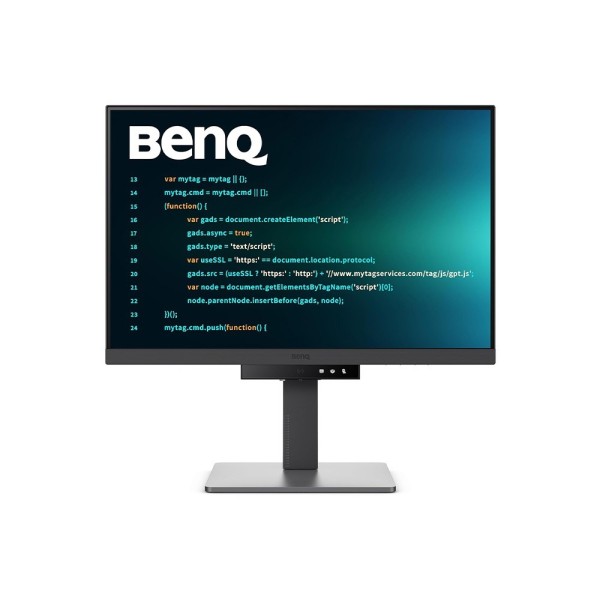


×
❮❯
Save 2,001৳ · -4%
🔥 Today's Hot Deals - see all offers→ 53,999৳Was 56,000৳
● In stock
Key Features
- 24.1" 2560x1600 IPS, 16:10, 60Hz
- 95% P3, 1.07 billion colors, HDR10
- USB-C, HDMI 2.0, DP 1.4, 3 x USB-A
- Height, swivel, 90° pivot, 3 yr warranty
- Specification
- Description
- Reviews (0)
- Questions (0)
- Related
Specification
| Display | |
|---|---|
| Brightness | 300 nits |
| Contrast | 1000:1 |
| Display Resolution | 2560 x 1600 (WQXGA) |
| Display Size | 24.1 inch |
| Panel Type | IPS |
| Refresh Rate | 60Hz |
| Response Speed | 5ms GTG |
| Audio | |
|---|---|
| Built-in Speaker | Yes, 2W x 2 |
| Basic Information | |
|---|---|
| Color Temperature | Bluish, Normal, Reddish, User |
| Type | Programming monitor |
| Features | |
|---|---|
| Certification | TUV Eye Comfort 2.0, EyeSafe 2.0 |
| Color Coverage | 95% P3 |
| Pixel Density | 125 PPI |
| Screen Coating | Anti-glare (matte) |
| Ports & Slots | |
|---|---|
| DisplayPort | 1 x DisplayPort 1.4 |
| HDCP | 2.2 |
| HDMI | 1 x HDMI 2.0 |
| Jack | Headphone out |
| USB Port | 3 x USB 3.2 Gen 1 (4.5W charging) |
| USB Type-C | 1 x USB-C |
| Power | |
|---|---|
| Power Consumption | 20W normal, 178W max |
| Power Supply | Built-in, 100-240V |
| Technical Specification | |
|---|---|
| Backlight Type | LED |
| Color Depth | 1.07 billion colors |
| Curvature | Flat |
| Eye Care | B.I. Gen2, ePaper, Night Hours |
| Flicker Free | Yes |
| HDR | HDR10 |
| Low Blue Light | Yes |
| Screen Ratio | 16:10 |
| View Angle | 178° / 178° |
| Physical Specification | |
|---|---|
| Stand | 110mm height, tilt, swivel, pivot |
| VESA Mount | 100 x 100 mm |
| Color | Black |
| Weight | 7.6 kg (5.0 kg without stand) |
| Dimensions | 533.6 x 412-522 x 228.6 mm (WxHxD) |
| Warranty Information | |
|---|---|
| Warranty | 3 years (not for internal dust) |
Overview
BenQ RD240Q 24.1 Inch WQXGA IPS USB-C Programming Monitor Price in Bangladesh
Want to know the BenQ RD240Q price in Bangladesh? The BenQ RD240Q is a 24.1 inch programming monitor with a 2560 x 1600 IPS panel. Its taller 16:10 shape shows more lines of code on screen at once.
It is made for software developers, students learning to code and people who read long documents. Writers and analysts who scroll all day will also like the extra height. You can check the BenQ RD240Q price in Thakurgaon too, as we deliver nationwide.
Before you order, check how your laptop or PC will connect. The monitor offers USB-C, HDMI and DisplayPort. Pick the cable that matches your computer.
Top Highlights
- Tall WQXGA screen: 2560 x 1600 pixels in a 16:10 shape.
- Rich colour panel: IPS with 95% P3 and 1.07 billion colours.
- One-cable USB-C: Connect a laptop plus three USB-A ports.
- Full ergonomic stand: Height, tilt, swivel and 90-degree pivot.
About the BenQ RD240Q 24.1 Inch WQXGA IPS USB-C Programming Monitor
Why 16:10 Helps Coders
Most monitors are 16:9, which is wide but short. The RD240Q is 16:10, so you get 1600 pixels of height instead of 1440 or 1080. In simple words, you see more code, more rows and more text, and you scroll less.
Sharp Text at 125 PPI
The 24.1 inch panel packs 125 pixels per inch. Small fonts in your editor and terminal look crisp, not blurry. This also helps when you read PDFs, research papers or long web pages.
Eye-Care for Long Sessions
The screen is flicker-free and has low blue light settings. BenQ also lists Brightness Intelligence Gen2, ePaper mode and Night Hours Protection for late work. It carries TUV Eye Comfort 2.0 and EyeSafe 2.0 certification.
Design & Performance
Design and Build
The stand lifts the screen by up to 110 mm and tilts from -5 to 20 degrees. It also swivels 15 degrees each way. You can turn the screen 90 degrees into portrait mode for very long files.
The monitor weighs about 7.6 kg with the stand and 5.0 kg without it. A 100 x 100 mm VESA mount lets you use a monitor arm instead. The power supply is built in, so there is no adapter on the floor.
Performance in Daily Use
The IPS panel gives 300 nits of brightness and a 1000:1 contrast ratio. The anti-glare surface keeps reflections low in a bright office. HDR10 support lets you preview HDR video, though this is not an HDR showcase screen.
The refresh rate is 60Hz with a 5ms response time. That is right for coding and office work, while fast esports titles need a screen from our gaming section. Two 2W speakers are built in for calls and system sounds.
Who It's For
Software Developers
Coders get more vertical space for functions, logs and terminal output. Portrait mode turns the screen into a tall code page. With USB-C, a laptop can connect with one cable on a tidy desk.
Students and Learners
If you are learning programming or data science, this screen gives room for tutorials and your editor side by side. The eye-care features help during long night study. The 24 inch size still fits a normal student desk at home or in a hostel.
Writers, Analysts and Office Teams
Long reports, spreadsheets and contracts are easier to read on a taller screen. You can see more rows in Excel without zooming out. The 95% P3 colour range also suits light photo and design work.
Simple Buying Guide
Check Your Laptop's USB-C Port
Not every USB-C port sends video. Look for a DisplayPort or Thunderbolt logo next to your laptop's port, or check its manual. If it has no video over USB-C, use the HDMI or DisplayPort input.
Think About Screen Shape
A 16:10 screen suits reading and coding more than films. If you mostly watch movies or play games, a 16:9 model may fit better. You can compare shapes and sizes in our monitor collection.
Plan Your Desk Setup
The stand base is about 229 mm deep, so leave room in front for your keyboard. A monitor arm frees more space. Budget buyers can also look at our Dell used monitors for a second screen.
Easy Steps to Check Before You Order
First, find which video output your computer has. USB-C with video, HDMI or DisplayPort will all work well.
Next, decide if you want portrait mode. The stand can rotate the screen 90 degrees for long code files and web pages.
Then, measure your desk depth and width carefully. The monitor is about 534 mm wide with the stand.
Last, count your USB devices. The monitor gives three USB-A ports for a keyboard, mouse or webcam, so your desk stays simple.
What's in the Box
BenQ lists a quick start guide, a warranty card, a safety sheet and HDMI and USB-C signal cables, which may vary by region. Please confirm the exact box contents with our team before ordering.
When the parcel arrives, open it with care. Check the screen and stand for damage. Make sure all items are inside.
Warranty
The BenQ RD240Q comes with a 3-year warranty. The warranty does not cover problems caused by internal dust. Keep the invoice and box for any future service.
Why Buy From Megabuy BD?
Megabuy BD sells 100% authentic products with official warranty. We deliver all over Bangladesh, including Thakurgaon. Orders inside Dhaka usually arrive in 24 to 48 hours, and other districts take a little longer.
Cash on delivery is available, so you pay only when the monitor reaches your door. Our friendly team supports you in Bangla and English. Ask us before you order if you are unsure about your laptop USB-C port, and we will help you choose the right cable.
Frequently Asked Questions
What is the BenQ RD240Q price in Bangladesh?
The latest price is shown at the top of this product page. Prices can change with stock and import costs. Please check this page or contact Megabuy BD before ordering. We will confirm the price and the delivery time for your area.
Can I connect my laptop with one USB-C cable?
Yes, if your laptop's USB-C port supports video output. Many modern laptops do, but some budget models do not. Check for a DisplayPort or Thunderbolt logo next to the port. If not, use the HDMI or DisplayPort input with the right cable.
Is the RD240Q good for gaming?
It is designed for coding and office work, not fast gaming. The refresh rate is 60Hz with a 5ms response time. Casual and slow games are fine. For competitive games, a 144Hz or faster gaming monitor is a better choice.
Order From Megabuy BD
Check the latest BenQ RD240Q price in Bangladesh and order from Megabuy BD today.
What is the price of BenQ RD240Q 24.1 Inch WQXGA IPS USB-C Programming Monitor?
The latest price of BenQ RD240Q 24.1 Inch WQXGA IPS USB-C Programming Monitor in Bangladesh is 53,999৳. You can buy the BenQ RD240Q 24.1 Inch WQXGA IPS USB-C Programming Monitor at the best price from our website or visit our shop.
Reviews
Questions (0)
Have a question about this product? Ask our team.
Ask questionRecently viewed
53,999৳
56,000৳
